

Most creators assume their accounts are safe until the day they aren't. A single compromised login can wipe out years of audience building, brand deals, and content libraries in hours. The risks are real and growing: social platforms are prime targets for phishing, impersonation, and data harvesting. Whether you manage one account or twenty, understanding how attacks happen and what defenses work is no longer optional. This guide walks you through the specific threats facing creators and marketers, the privacy settings that actually matter, and the posting habits that quietly protect your digital footprint every single day.
Table of Contents
- Understanding major threats to social media accounts
- Privacy settings and account basics: The first line of defense
- Posting strategies and security: Staying safe while being active
- Advanced security tactics for creators and marketers
- Our take: What most creators overlook about social media security
- Take the next step in securing your social media presence
- Frequently asked questions
Key Takeaways
| Point | Details |
|---|---|
| Identify major threats | Phishing, account takeover, and scams are the biggest risks for creators and marketers. |
| Protect with privacy settings | Strong passwords and careful profile management are vital first-line defenses. |
| Apply secure posting habits | Review content and use privacy tools before posting to minimize exposure. |
| Advance your security toolkit | Use apps and image anonymization to proactively safeguard your accounts. |
Understanding major threats to social media accounts
Before you can defend yourself, you need to know what you're defending against. Most account compromises don't happen through sophisticated hacking. They happen because someone clicked the wrong link, reused a password, or trusted a message that looked legitimate.
Phishing is the most common attack. A creator receives a message that looks like it's from Instagram, TikTok, or a brand partner. The message creates urgency: "Your account will be suspended," or "Claim your verified badge now." One click leads to a fake login page that captures your credentials. The FTC warns specifically against clicking unexpected links promising investments or fixes, and recommends verifying every request through official channels.
Account takeovers and impersonation cause a different kind of damage. Once someone controls your account, they can message your followers, promote scams, delete your content, or lock you out permanently. For marketers managing client accounts, this is a business-ending event.
Here's a quick comparison of the most common threats creators face:
| Threat | How it works | Primary target |
|---|---|---|
| Phishing | Fake links or login pages | Credentials |
| Brute force | Repeated password guessing | Weak passwords |
| Social engineering | Manipulation via DMs or email | Trust and access |
| Impersonation | Fake accounts mimicking you | Reputation and followers |
| App permissions | Third-party apps with excess access | Account data |
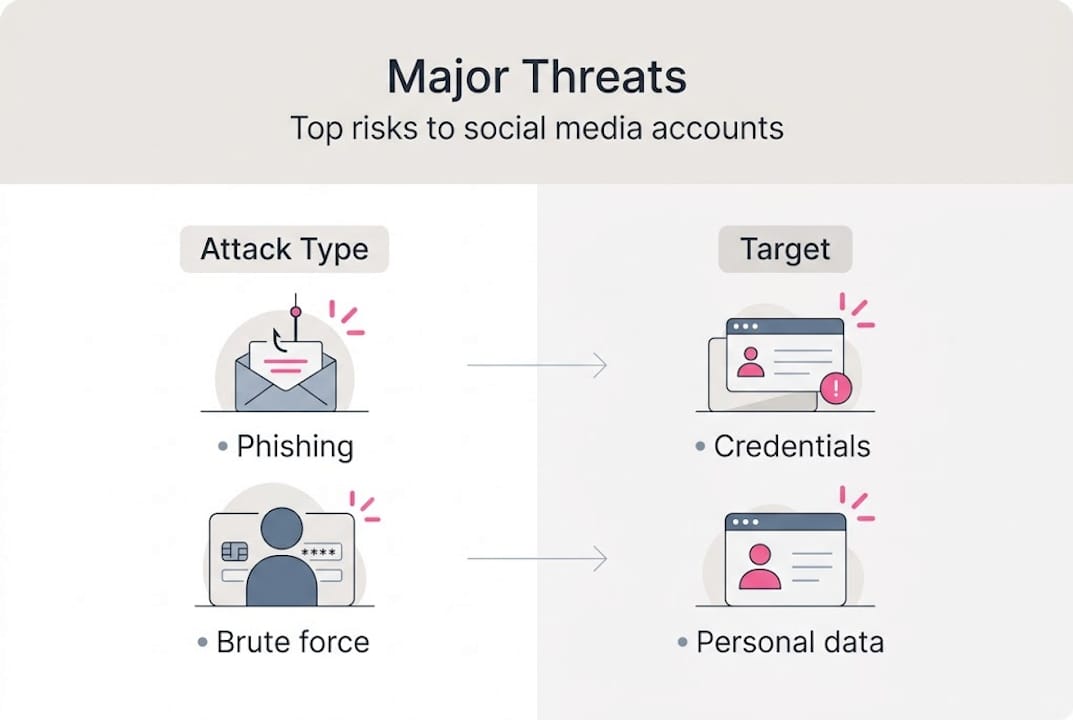
The most underestimated threat is social engineering. An attacker pretends to be a brand, a collaborator, or even a fan. They build trust over several messages before asking for something that compromises your account. Real creators have lost accounts this way after months of what felt like a genuine partnership conversation.
Key warning signs to watch for:
- Messages creating urgency or fear about your account status
- Requests for login credentials or verification codes
- Links that don't match the platform's official domain
- Offers that seem unusually generous or too good to be true
"If a message asks you to act fast, that's the signal to slow down. Legitimate platforms don't demand immediate action through DMs."
Understanding these threats is the first step. The next is building defenses that hold up under real pressure.
Privacy settings and account basics: The first line of defense
Most creators set up their accounts once and never revisit the settings. That's a problem. Platforms update their privacy controls regularly, and default settings often favor visibility over protection.
Start with the fundamentals. The DHS privacy guidance recommends limiting profile information, using a separate email for each social account, and enabling all available privacy settings. These three steps alone eliminate a large portion of your exposure.
Here's a practical setup checklist:
- Create a dedicated email address for each platform. Never use your primary personal or business email. This limits the blast radius if one account is compromised.
- Set a strong, unique password for every account. Use a password manager to generate and store them. Never reuse passwords across platforms.
- Enable two-factor authentication (2FA) on every account. Use an authenticator app rather than SMS, since SIM-swapping attacks can intercept text messages.
- Review connected apps and third-party integrations. Remove anything you no longer use or don't recognize.
- Audit your profile information. Remove your phone number, home city, and any personal details that aren't necessary for your audience.
Separating business and personal accounts isn't just about branding. It's a security strategy. When your personal email, personal device, and personal accounts are all linked together, one breach can cascade across everything you own.
| Platform | Key privacy setting | Where to find it |
|---|---|---|
| Restrict unknown followers | Settings > Privacy | |
| TikTok | Limit DMs to followers only | Settings > Privacy |
| X (Twitter) | Protect your posts | Settings > Privacy and Safety |
| Limit past post visibility | Settings > Privacy Checkup | |
| Control profile visibility | Settings > Visibility |
For creators managing security for social media images, the same principle applies to your visual content. Images carry hidden data that can reveal more than you intend.
Pro Tip: Use a separate browser profile or even a separate device for each major account. If malware or a compromised extension affects one browser, it won't automatically have access to all your accounts.
Posting strategies and security: Staying safe while being active
Your account settings create a foundation, but your daily posting behavior is where most security gaps actually live. Every image you upload, every caption you write, and every tag you add is a potential data point for someone trying to build a profile on you.
Images are a major risk that most creators ignore. Photos taken on smartphones contain EXIF metadata, which is embedded data that can include your exact GPS coordinates, device model, camera settings, and timestamp. When you upload that image directly to social media, some platforms strip this data and some don't. You can't always control which platforms keep it.
Smart posting habits to protect your privacy:
- Strip metadata from images before uploading, especially for location-sensitive content
- Avoid posting real-time location updates. Share locations after you've left the area
- Be cautious with geotagging features. A tagged location at your home or regular studio is a permanent record
- Review captions for personal details: street names, landmarks, license plates, or faces of people who haven't consented
- Avoid posting your daily schedule or predictable routines
The DHS privacy guidance specifically addresses limiting the personal information you share publicly, and that applies directly to your posting habits, not just your profile settings.
For marketers managing multiple client accounts, the risk compounds. A single post that reveals a client's location or routine can create liability. The FTC's phishing warnings are also relevant here: attackers often use publicly available post data to craft convincing, personalized phishing messages.
Managing privacy with social images is a practical step that fits directly into your content workflow without slowing you down.
Pro Tip: Draft your posts offline in a notes app or content scheduler. Before uploading, do a quick privacy review: check the image for metadata, scan the caption for personal details, and confirm the timing doesn't reveal your location in real time.
Advanced security tactics for creators and marketers
Once your basics are locked in, you can layer on more sophisticated protections. These tactics are especially important for creators managing multiple platforms or running accounts for clients.
Here's a structured approach to advanced security:
- Use a VPN on public networks. Coffee shops, airports, and coworking spaces are prime locations for network-based attacks. A VPN encrypts your connection and masks your IP address.
- Set up login alerts. Most major platforms allow you to receive notifications when a new device logs into your account. Enable this everywhere.
- Audit app permissions quarterly. Third-party apps connected to your accounts accumulate permissions over time. Revoke access for any app you haven't used in 90 days.
- Use a password manager with breach monitoring. Services like 1Password or Bitwarden alert you when a stored credential appears in a known data breach.
- Separate your content creation tools from your browsing. Don't use the same browser for social media management and general web browsing.
For multi-platform creators, keeping track of security across five or more accounts is genuinely complex. Build a simple monthly checklist:
- Review active sessions on each platform
- Check for unauthorized posts or messages
- Rotate passwords for high-value accounts
- Verify that 2FA is still active and using the correct authenticator app
The DHS social media safety guide recommends treating your social presence as an ongoing security responsibility, not a one-time setup task.
For image-based content, anonymizing your visuals before posting is a powerful layer of protection. Tools that help you secure social media images remove embedded metadata and generate unique visual variations, so the same image doesn't create a traceable fingerprint across accounts.
Pro Tip: Create a dedicated "security day" once a month. Block 30 minutes to review all connected apps, check active sessions, update any outdated passwords, and confirm your recovery options are current. Consistency matters more than complexity.
Our take: What most creators overlook about social media security
Here's the uncomfortable truth: most creators invest in security only after something goes wrong. They'll spend hours customizing their feed aesthetic but won't spend five minutes reviewing their connected apps. That imbalance is exactly what attackers count on.
The biggest security gains don't come from advanced tools. They come from simple, consistent habits. Using a separate email for each platform, never reusing passwords, and reviewing your account alerts weekly will protect you more than any premium security software.
What we see most often is creators ignoring small warning signs: an unfamiliar login location, a slight drop in reach that might indicate shadowbanning, a DM from a "brand" with a slightly off username. These signals matter. Treat every anomaly as worth investigating.
Security is also not a one-time fix. Platforms change their settings, attackers develop new tactics, and your own content strategy evolves in ways that create new exposures. Staying protected means staying curious and revisiting your setup regularly.
Using image privacy tools as part of your regular workflow is one of those small habits that quietly compounds over time. The creators who stay secure aren't doing anything magical. They're just consistent.
Take the next step in securing your social media presence
You now have a clear picture of the threats, the defenses, and the daily habits that keep your accounts protected. The next step is putting those lessons into action with tools built for exactly this purpose.

One2Many.pics gives creators and marketers a practical way to protect their visual content before it ever reaches a platform. By stripping metadata and generating unique image variations, you can post untraceable social images across multiple accounts without leaving a digital trail. Whether you're managing one account or scaling across dozens, the platform fits directly into your existing workflow. It's a simple, effective layer of protection that most creators don't know they're missing until they start using it.
Frequently asked questions
What are the best privacy settings to use on social media?
Enable two-factor authentication, limit profile information to only what's necessary, and regularly review each platform's privacy controls. The DHS recommends using separate emails for each account as a baseline step.
How do I spot a phishing scam targeting my social media account?
Phishing attempts usually involve urgent messages, suspicious links, or requests for login credentials. The FTC advises verifying every unexpected request through official platform channels before taking any action.
Is it safe to use the same email for all my social media accounts?
Using a single email for all accounts means one breach can expose everything. Separate emails for each platform make targeted attacks significantly harder to execute.
Can anonymized images improve my social media security?
Yes, removing EXIF metadata from images before posting prevents location data, device information, and timestamps from being exposed, which reduces your trackable digital footprint across platforms.