

A secure content sharing process is defined as a structured workflow that combines client-side encryption, permission-based access controls, and governance policies to protect digital assets from unauthorized access, platform detection, and accidental exposure. For content creators and marketers, this process is not optional. Platforms like Instagram, TikTok, and LinkedIn actively scan for metadata, duplicate fingerprints, and uncontrolled distribution patterns that trigger shadowbanning or content suppression. Tools like SecuShare, Keeper, and Databricks Delta Sharing each demonstrate that the most effective protection combines zero-knowledge architecture with granular access governance. Getting this right means your content reaches the right people without leaving a traceable digital footprint or triggering platform penalties.
What technologies and encryption methods ensure secure content sharing?
Client-side end-to-end encryption using AES-256-GCM is the current gold standard for protecting content during transfer and storage. This means encryption happens entirely in the user's browser before any data touches a server. The server receives only ciphertext, never the original file or the key to read it.
The zero-knowledge architecture takes this further. Embedding the decryption key in the URL fragment (the portion after the # symbol) means the key is never transmitted in HTTP requests and never logged by the server. SecuShare and SecureShare-OSS both implement this method, making it practically impossible for a compromised server to expose your content. For marketers sharing campaign assets or unreleased visuals, this is the difference between a controlled preview and a leaked launch.
Here is what a zero-knowledge encrypted sharing stack typically includes:
- AES-256-GCM encryption performed entirely in the browser before upload
- URL fragment key embedding so the server never holds the decryption key
- PBKDF2 key derivation for optional password protection on top of encryption
- Zero-knowledge server design where infrastructure operators cannot read stored content
- Client-side decryption so only the recipient with the correct URL and password can open the file
Pro Tip: When evaluating any encrypted sharing tool, ask one question: does the server ever see the decryption key? If the answer is yes or unclear, the tool does not qualify as zero-knowledge, regardless of marketing claims.
Understanding zero-trust credential sharing reinforces why client-side encryption matters so much. If your infrastructure is ever breached, zero-knowledge design means attackers get encrypted blobs with no keys attached. That is the only architecture worth trusting for confidential content distribution.
How to control and govern access when sharing content securely?
Encryption protects content in transit, but access governance determines who can do what with it once it arrives. Role-based permissions in Keeper demonstrate how fine-grained this control can get: view-only, edit, share, and ownership levels each carry different risk profiles and should be assigned deliberately.
The table below compares common permission levels and their appropriate use cases for marketing teams:
| Permission level | What it allows | Best used for |
|---|---|---|
| View-only | Open and read, no download or copy | External reviewers, client approvals |
| Edit | Modify content within the platform | Internal collaborators, copywriters |
| Share | Forward or invite others | Team leads, project managers |
| Ownership | Full control including revocation | Asset owners, security administrators |
Invitation-based access adds another layer. Rather than sending a public link, verified sharing requires recipients to authenticate before accessing content. This prevents forwarded links from being opened by unintended parties, which is a common source of accidental exposure in marketing workflows.
Time-limited sharing is equally important. Configurable expiration windows from 1 hour to 30 days with automatic revocation mean that even if a link is forwarded after a campaign ends, it simply stops working. Keeper's model also supports manual revocation at any point, giving asset owners full control over active shares.
Pro Tip: Set a calendar reminder to audit active shares every two weeks. Most accidental oversharing is not malicious. It is forgotten access that was never revoked after a project closed.
Audit logs from Databricks Delta Sharing show exactly what a complete access record looks like: timestamps, user identities, share events, and download actions. For compliance-conscious marketing teams, this kind of auditability is not just good practice. It is the evidence trail that proves your sharing process was controlled if questions arise later.
What governance workflows prevent data leaks and platform penalties?
Governance is the layer that sits above encryption and permissions. It answers the question: before this content leaves your control, has it been properly prepared? Classification, redaction, watermarking, and revocation form the core checklist that prevents accidental data leakage, and permission settings alone cannot replace this foundation.
Follow this governance workflow before sharing any digital asset externally:
- Classify the content. Label it as public, internal, confidential, or restricted. This single step determines every subsequent decision about how it can be shared.
- Redact sensitive information. Remove PII, location data, device identifiers, and any metadata that could expose your identity or your client's. Tools like FileOrbis use policy-driven OCR masking to detect and strip sensitive fields automatically during upload.
- Apply dynamic watermarks. Watermarks that embed recipient identity or timestamp make unauthorized redistribution traceable. Disable forwarding and printing permissions where the platform allows.
- Classify the share URL itself. Treat shared URLs as governed artifacts with metadata including owner, campaign name, destination, and expiration date. This prevents ad hoc sharing decisions and creates an auditable record.
- Set expiration and revocation rules. Define when access ends before the link goes out, not after the campaign closes.
- Monitor engagement analytics. Track who opened the link, when, and from where. Unexpected access patterns are early warning signs of a governance failure.
- Review permissions quarterly. Remove stale access, update classification labels as content ages, and close any sharing channels that are no longer active.
For content creators specifically, the platform penalty risk is real. Platforms detect duplicate metadata, repeated file fingerprints, and uncontrolled distribution patterns. A governed sharing process that strips metadata and controls distribution paths directly reduces the risk of duplicate content detection triggering suppression across your accounts.
How to implement a secure content sharing process step by step
A practical implementation does not require enterprise-grade infrastructure. It requires a consistent sequence of decisions applied to every asset before it leaves your control. Here is how to build that sequence into your workflow.
Step 1: Prepare and classify your content. Before encryption or upload, decide what classification level applies. Unreleased campaign visuals are confidential. Published assets repurposed for a partner are internal. Classification drives every downstream decision.
Step 2: Strip metadata and encrypt. Remove EXIF data, location tags, device identifiers, and timestamps from image and video files. Then encrypt using a zero-knowledge tool. Secure online file sharing guidance from Egnyte recommends centralizing assets in an encrypted repository with role permissions and audit trails built in, rather than relying on ad hoc email attachments.
Step 3: Set permissions before sending. Assign the minimum permission level the recipient actually needs. A client reviewing a campaign draft needs view-only access, not edit rights. A contractor uploading revised assets needs edit access to a specific folder, not the entire workspace.
Step 4: Configure expiration and revocation. Set an expiration date that matches the project timeline. For campaign assets, expiration at campaign launch makes sense. For client approvals, 48 to 72 hours is usually sufficient.
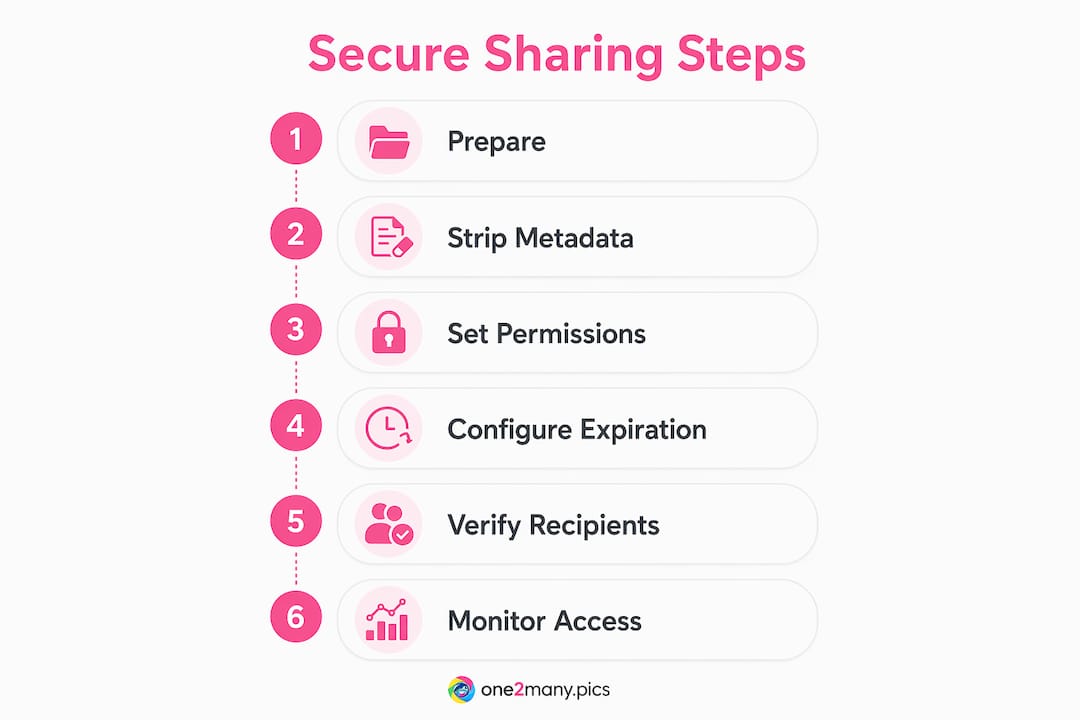
Step 5: Invite verified recipients. Send invitation-based access rather than public links. Require authentication before the recipient can view the file. This one step eliminates the majority of accidental exposure incidents caused by forwarded links.
Step 6: Monitor access logs. Check who accessed the content and when. Flag any access from unexpected locations or devices. Review logs before closing a project to confirm no active shares remain open.
Pro Tip: Build a simple sharing checklist into your project management tool, whether that is Notion, Asana, or Trello. A five-item checklist completed before every external share takes 90 seconds and eliminates the most common governance failures.
The visual content security practices that matter most for creators combine metadata removal with controlled distribution. Both are required. Encryption without metadata stripping still leaves a traceable fingerprint. Metadata removal without encryption still leaves content readable in transit.
What common mistakes should content creators watch for?
Most secure sharing failures are not technical. They are procedural. The following mistakes account for the majority of accidental exposures and platform penalties in marketing workflows.
- Using public links by default. Public links require no authentication and can be forwarded indefinitely. Replace them with invitation-based or password-protected links for any confidential asset.
- Skipping metadata removal. Images shared with original EXIF data intact expose device type, GPS coordinates, and shooting timestamp. Platforms and recipients can both read this data.
- Forgetting to revoke access after project completion. Time-bounded access with auto-revocation solves this structurally, but manual revocation is still required for shares without expiration settings.
- Oversharing permissions. Giving edit or share rights to someone who only needs to view content creates unnecessary risk. Apply the principle of least privilege to every share.
- Ignoring URL governance. Unclassified links with no owner, no expiration, and no campaign metadata are impossible to audit. URL classification with governance metadata is the fix.
- Reusing the same file across multiple platforms without variation. Identical files shared across accounts trigger duplicate detection algorithms. Varying file fingerprints and stripping metadata before each distribution cycle is the correct approach, and it connects directly to avoiding platform suppression.
The detection evasion risks on social media that creators face are not solved by encryption alone. Platform algorithms scan for behavioral patterns, metadata consistency, and file fingerprint repetition. Governance and metadata management are the tools that address those specific risks.
Key takeaways
A secure content sharing process requires client-side encryption, role-based permissions, metadata governance, and audit logging to protect digital assets and prevent platform penalties.
| Point | Details |
|---|---|
| Encrypt at the client level | Use AES-256-GCM with zero-knowledge architecture so servers never hold decryption keys. |
| Govern before you share | Classify, redact, and watermark content before any external link is generated. |
| Set expiration on every share | Time-limited access with auto-revocation eliminates forgotten open links after projects close. |
| Treat URLs as governed artifacts | Assign owner, campaign, destination, and expiration metadata to every shared link. |
| Strip metadata from visual assets | Removing EXIF data and file fingerprints prevents platform detection and protects creator identity. |
Why most teams get secure sharing wrong
The uncomfortable truth about content sharing security is that most teams treat it as a technical problem when it is actually a workflow problem. They invest in encrypted tools, then share files via unprotected email attachments the moment a deadline gets tight. The tool is only as secure as the habit around it.
At One2many, we see this pattern constantly with creators and marketing teams. The encryption is in place. The permissions exist. But the governance layer, the classification step, the metadata review, the expiration setting, is skipped because it feels like friction. That friction is the security. Removing it removes the protection.
Zero-knowledge architecture and zero-trust principles are not just technical choices. They are organizational commitments. They mean deciding that no single server, no single employee, and no single forwarded link should have unchecked access to your content. That decision has to be made at the workflow level, not just the tool level.
The teams that get this right share one characteristic: they build the checklist into the process before the deadline pressure arrives. Classification happens at asset creation, not at the moment of sharing. Expiration dates are set by default, not as an afterthought. Audit logs are reviewed on a schedule, not only after an incident.
The emerging shift toward AI-driven classification tools, where platforms like FileOrbis use OCR and policy engines to auto-classify content during upload, will reduce the manual burden significantly. But the underlying discipline of treating every shared asset as a governed artifact will remain the foundation. Tools change. The principle does not.
— one2many.pics
Protect your content with One2many
Content creators and marketers who need to share visual assets across platforms without leaving a traceable footprint have a direct solution in One2many. The platform strips metadata including location, device info, and timestamps from images, then generates unique visual variations that bypass duplicate detection algorithms on Instagram, TikTok, and similar platforms.

One2many is built specifically for the workflow described in this article: prepare, strip, vary, and distribute with privacy intact. Whether you manage a single account or run a multi-account agency operation, the platform's secure content distribution tools handle the metadata governance and file variation steps that most creators skip. Plans scale from single-image processing to bulk automation with workflow integrations, making privacy-first content sharing practical at any volume.
FAQ
What is a secure content sharing process?
A secure content sharing process is a structured workflow combining client-side encryption, role-based permissions, metadata governance, and audit logging to protect digital assets during distribution. It prevents unauthorized access, accidental exposure, and platform detection issues.
What encryption method is best for sharing content securely?
AES-256-GCM encryption performed client-side, with decryption keys embedded in the URL fragment, is the most effective method. This zero-knowledge approach ensures the server never holds the key needed to read your content.
How do I prevent platform penalties when sharing content?
Strip metadata including EXIF data, GPS coordinates, and device identifiers from files before sharing or posting. Vary file fingerprints across platforms to avoid duplicate detection algorithms that trigger shadowbanning or content suppression.
How long should shared content links stay active?
Set expiration windows that match the project timeline, typically 48 to 72 hours for client approvals and up to 30 days for active campaign collaborations. Auto-revocation after expiry eliminates forgotten open access links.
What is the biggest mistake in content sharing security?
Skipping the governance layer before sharing is the most common failure. Encryption and permissions mean little if content is not classified, metadata is not stripped, and URLs are not assigned expiration dates before distribution begins.