

A privacy-focused posting workflow is a content publishing process that protects your data, prevents platform penalties like shadowbanning, and keeps your digital footprint invisible to both platforms and third parties. The industry term for this approach is "privacy-by-design publishing," and it applies directly to social media creators and marketers who manage multiple accounts, repurpose content, or run campaigns that require confidential outreach. Tools like Blurt.sh, Isar DB, and end-to-end encryption protocols form the technical backbone of this approach. Without a deliberate system in place, every post you publish can expose device metadata, location data, and account patterns that trigger duplicate detection or content suppression.
What tools and technologies enable a privacy-focused posting workflow?
The foundation of any privacy-first workflow is local control. Modern privacy-first workflows avoid third-party API keys entirely by publishing content directly from logged-in browser sessions, storing all data locally with zero telemetry. This matters because most third-party scheduling tools send your content, credentials, and behavioral data to external servers before a single post goes live.
The three-stage filesystem method
The most reliable technical structure for private posting is a filesystem state machine that moves drafts through three folders: "queue/, sent/, and failed/. Each file represents a discrete content state. When a post publishes successfully, it moves to sent/. If it fails, it lands in failed/` for review. This approach maintains a permanent local record of your content history without depending on any proprietary scheduling software.

Files managed as discrete state entities remain accessible and readable even if the publishing tool you use is discontinued. That is a significant advantage over database-only systems, where your content history is locked inside a vendor's infrastructure. Local filesystem management gives you true ownership.
For local database needs, tools like Isar DB provide zero-cloud-sync storage. Isar is a NoSQL database built for local-first applications, meaning your content queue never touches an external server. Combined with a filesystem state machine, it creates a publishing environment where no third party can observe your workflow patterns.
| Tool | Privacy feature | Best use case |
|---|---|---|
| Blurt.sh | Filesystem state machine, local-only | Solo creators managing post queues |
| Isar DB | Zero-cloud-sync local database | Agencies storing content metadata locally |
| PostCraft | URL fragment encryption for share links | Teams sharing drafts without server exposure |
| Fanout | Browser-session publishing, no API keys | Marketers avoiding third-party telemetry |
Pro Tip: Store your queue/ folder on an encrypted local drive rather than a synced cloud folder like Google Drive or Dropbox. This keeps your content pipeline completely off external servers until the moment of publishing.
How to design a step-by-step workflow to prevent shadowbanning
Shadowbanning is not random. Platforms detect behavioral patterns: duplicate image hashes, repeated metadata signatures, and posting rhythms that match automation scripts. A well-designed private social media workflow disrupts those patterns at every stage.
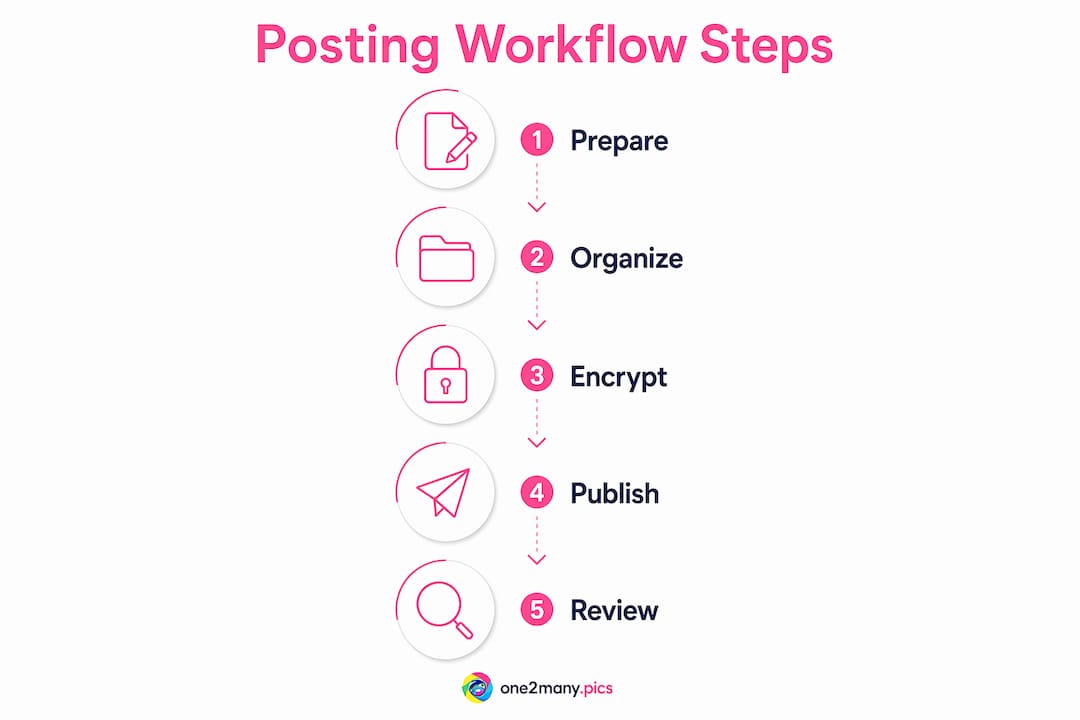
Here is a practical step-by-step process:
-
Draft with stripped metadata. Before any content enters your queue, remove EXIF data including location, device model, and timestamps from all images. Tools like One2many handle this automatically by generating visually unique image variants with no traceable metadata.
-
Queue locally. Move cleaned drafts into your
queue/folder. Each file should be named with a timestamp and a content identifier, not a brand name or campaign title. Generic naming prevents accidental exposure if the folder is ever accessed by an unauthorized party. -
Publish in parallel across accounts. Use separate browser sessions for each account, not a single dashboard connected to multiple profiles. Publishing from logged-in sessions without API keys means the platform sees organic behavior rather than automation signatures.
-
Embed platform permalinks into your archive. Once a post goes live, copy the platform URL and write it back into the file's metadata or a companion text file before moving it to
sent/. This creates a permanent local record linking your archived content to its live location. -
Log failures immediately. Any post that fails moves to
failed/with a timestamp and a note on the failure reason. Review this folder weekly to identify patterns, such as a specific account triggering duplicate detection, before they escalate. -
Rotate posting times. Posting at identical intervals across accounts is a detectable pattern. Vary your schedule by 15 to 45 minutes between accounts to mimic organic behavior.
The most common pitfall in this process is over-sharing credentials. Giving a scheduling tool or agency partner full account access exposes your login behavior and session data. Limit access to the minimum required for each task.
Pro Tip: Use a dedicated browser profile for each social account, with no cross-profile cookies or shared sessions. Firefox's Multi-Account Containers or Brave's separate profile feature both accomplish this without requiring additional software.
What secure content sharing methods protect sensitive posts?
Secure content sharing goes beyond password protection. The most effective method for protecting sensitive drafts and campaign materials is end-to-end encryption using URL fragments. When an encryption key is embedded in the # portion of a URL, it never reaches the server. The server only sees the base URL. The decryption key lives exclusively in the recipient's browser.
Generating share links with URL fragments ensures that server logs and databases cannot capture usable decryption information. This is a meaningful distinction from standard query parameter links, where the key appears after a ? and is logged by every server the request passes through.
Persistent protection features add another layer. Platforms like Digify allow you to revoke access to a shared file after it has been sent, set expiration dates on links, and track who opened what and when. For marketers sharing campaign briefs or pre-launch content with partners, these controls prevent content from circulating beyond its intended audience.
| Sharing method | Key exposure | Access revocation | Expiration support |
|---|---|---|---|
| URL fragment encryption | None (client-only) | Yes | Yes |
| Standard query parameter link | Server-logged | Limited | Rare |
| Password-protected ZIP | Partial (password travels) | No | No |
| Email attachment | Full (server copies) | No | No |
For secure content sharing at scale, browser-based encryption tools that never expose keys to servers are the only category worth using. Any tool that processes your encryption key server-side has already compromised the privacy model.
Pro Tip: When sharing pre-launch content with collaborators, use a URL fragment encrypted link with a 48-hour expiration. If the campaign timeline shifts, revoke the link immediately rather than trusting that recipients will not forward it.
How can creators implement confidential posting strategies to minimize digital footprints?
Confidential posting strategies borrow directly from executive search methodology. Recruitment privacy experts recommend non-identifying descriptions and role-based permissions to control access and prevent data leakage. The same logic applies to social media campaigns: the less identifying information attached to a post or campaign before it goes live, the smaller the digital trail.
Using code names and industry descriptors instead of brand names during internal outreach prevents creating traceable digital trails before formal agreements or launch dates are in place. A campaign called "Project Horizon" in your internal tools is far less exposing than one labeled with your client's brand name across every shared document and Slack message.
Limiting internal disclosure to five or fewer trusted stakeholders reduces leak risk significantly. The risk of information exposure rises with every additional person who has access, and that principle applies directly to content queues, campaign briefs, and pre-launch assets.
Here are the core confidential posting behaviors worth building into your standard process:
- Assign code names to all campaigns in internal tools until the public launch date.
- Use generic role descriptions in shared documents rather than naming specific team members or clients.
- Restrict access to your content queue to the minimum number of people required for each stage.
- Avoid using your primary brand account for "warming up" new posting patterns. Use a secondary account to test timing and format before rolling out to your main profile.
- Communicate pre-launch details through encrypted channels rather than standard email or public Slack workspaces.
- Review your social media posting practices quarterly to identify any new exposure points introduced by platform updates or team changes.
Anonymous or low-identifying posting strategies also build audience trust faster than overt brand-forward content. Transparent-but-anonymous posting encourages merit-based engagement, where your content earns attention on its own quality rather than on brand recognition alone.
Key takeaways
A privacy-focused posting workflow requires local-first tools, filesystem-based state management, URL fragment encryption, and strict stakeholder access controls to prevent shadowbanning and data exposure.
| Point | Details |
|---|---|
| Use a filesystem state machine | Move content through queue/, sent/, and failed/ folders for full local control. |
| Strip metadata before queuing | Remove EXIF data from all images before any content enters your publishing pipeline. |
| Encrypt shares with URL fragments | Use #-based encryption links so decryption keys never reach external servers. |
| Limit stakeholder access | Keep internal campaign access to five or fewer people to reduce leak risk exponentially. |
| Separate browser sessions per account | Publish from isolated browser profiles to prevent cross-account behavioral signatures. |
Why most creators are solving the wrong privacy problem
Most creators focus their privacy efforts on the wrong layer. They use VPNs and private browsing, which protect network-level identity, but then upload images with full EXIF data and publish through third-party schedulers that log every action. The network layer is clean. The content layer is completely exposed.
At One2many, we have seen this pattern repeatedly. Creators invest time in anonymizing their browsing behavior while their images carry GPS coordinates, device serial numbers, and shooting timestamps that platforms read on every upload. That metadata is what triggers duplicate detection and shadowbanning, not the IP address.
The filesystem state machine approach is underused because it feels manual compared to a polished scheduling dashboard. But that perceived friction is actually the privacy benefit. Every step you can observe and control locally is a step that no third party can log, analyze, or act on. Cloud-based scheduling tools are convenient precisely because they handle everything for you. That convenience is the exposure.
The balance between privacy and engagement is real but manageable. You do not need to sacrifice reach to protect your data. You need to separate the two concerns: handle privacy at the infrastructure level through local tools and metadata stripping, and handle engagement at the content level through quality and timing. One2many's approach to image variation and metadata removal sits exactly at that intersection, giving creators the ability to post at scale without leaving a traceable pattern behind.
— one2many.pics
Take your privacy workflow further with One2many
Building a private social media workflow from scratch takes time, but the image layer does not have to be the hard part. One2many strips metadata including location, device info, and timestamps from your images and generates visually unique variants that bypass duplicate detection across platforms and accounts.

Every image processed through One2many exits with a clean metadata profile and a distinct visual fingerprint, so you can post the same core content across multiple accounts without triggering content suppression. For creators and agencies managing high-volume posting, the platform supports bulk processing with untraceable content workflows built for scale. If you are ready to close the gap between your network-level privacy and your content-level privacy, One2many is the place to start.
FAQ
What is a privacy-focused posting workflow?
A privacy-focused posting workflow is a content publishing process that uses local-first tools, metadata removal, and encrypted sharing to prevent platform penalties and protect creator data. It combines filesystem state management, browser-session publishing, and access controls to minimize digital exposure.
How does shadowbanning relate to metadata and image data?
Platforms detect duplicate content through image hashes and embedded metadata like GPS coordinates and device identifiers. Stripping this data and generating unique image variants before posting prevents duplicate detection and reduces shadowbanning risk.
What is URL fragment encryption and why does it matter for sharing?
URL fragment encryption embeds decryption keys in the # portion of a link, which browsers never send to servers. This means no server log or database can capture the key, making it the most private method for sharing sensitive content drafts.
How many people should have access to a confidential campaign?
Limiting access to five or fewer stakeholders reduces leak risk significantly. Each additional person with access increases exposure risk, so restrict campaign visibility to only those directly responsible for execution.
Can I use a filesystem workflow without technical expertise?
Yes. The core method requires only creating three folders (queue/, sent/, failed/) and moving files between them manually or with a simple script. Tools like Blurt.sh automate this process without requiring database management or cloud infrastructure.