
Image variation is the structured process of generating multiple distinct versions of a single base image to meet different platform requirements, aesthetic goals, and audience engagement targets. Content creators and social media managers who follow defined image variation process steps produce more consistent, brand-aligned visual content at scale. This guide walks you through every stage: preparation, strategy, AI-assisted generation, refinement, and deployment. Tools like Removedo, LensGo AI, and ImageGen2 each play specific roles in a professional workflow, and by the end of this article, you will know exactly how to use them.
What are the prerequisites and tools needed for image variation?
The quality of your variations is determined before you open any software. A strong base image is the single most important input in the entire process. Choose a photo with clear subject separation, good natural lighting, and a composition that leaves room for background manipulation. Resolution matters too: aim for at least 2000 pixels on the shortest side to preserve quality after cropping or resizing for different platforms.
One counterintuitive finding from ImageGen2's research: slightly imperfect base photos can produce more natural AI-generated variations than over-processed, heavily retouched originals. The underlying structure of the image matters more than surface polish. A photo with genuine depth and texture gives AI models more to work with.
Your tool stack should cover three functions: background removal, variation generation, and export. Removedo handles background isolation cleanly for product-focused content. LensGo AI and ImageGen2 both support image-to-image workflows where you upload a base and generate controlled variations. For manual editing, Adobe Photoshop and Canva cover cropping, color grading, and layout adjustments.
Before you upload anything, confirm these technical requirements:
- File format: PNG or TIFF for source files; JPEG for final exports
- Aspect ratios: 1:1 for Instagram feed, 9:16 for Reels and TikTok, 16:9 for YouTube thumbnails and LinkedIn
- Color profile: sRGB for all web and social exports
- Metadata: Strip location, device, and timestamp data before posting across multiple accounts to avoid platform duplicate detection
Pro Tip: Save your base image in its original unedited state as a master file. Every variation should branch from this master, not from a previously edited version, to prevent quality degradation across generations.
How to define a clear image variation strategy and categories?
Random variation generation wastes time and produces inconsistent results. Professionals define their variation categories before touching any tool. The goal is directional, theme-focused sets rather than a pile of loosely related images. This approach protects brand cohesion and makes it easier to test which visual style drives the most engagement on each platform.
Start by separating your fixed elements from your flexible ones. Fixed elements are the parts of the image that must stay consistent across every variation: your product, logo, brand colors, and any legally protected visual identity. Flexible elements are everything else: backgrounds, lighting conditions, props, color temperature, and seasonal details. Explicit separation of fixed and flexible elements in your prompts is non-negotiable because AI does not inherently preserve product integrity without specific instruction.
Once you have that separation mapped out, build your variation categories. Research from Removedo recommends planning 5 to 7 variation categories with 3 to 5 specific outputs per category. A practical category set for a product-focused creator might look like this:
- Clean e-commerce: White or neutral background, flat lighting, product centered
- Warm lifestyle: Natural setting, golden-hour lighting, props suggesting daily use
- Premium editorial: Dark or textured background, dramatic shadows, high contrast
- Bold ad creative: Graphic color blocks, high saturation, text-overlay-ready composition
- Seasonal campaign: Holiday or seasonal props, thematic color palette
- Platform-native format: Cropped and composed specifically for Stories, Reels, or Pins
- User-generated style: Slightly casual framing, softer editing to mimic organic content
Pro Tip: Map each category to a specific platform before you generate anything. Instagram feed, LinkedIn, and Pinterest each reward different visual styles. Matching category to platform from the start cuts your refinement time significantly.
This planning step transforms your visual content strategy from reactive to systematic. You are not guessing what looks good. You are executing a defined plan.
What are the step-by-step image variation generation methods?
With your strategy defined, execution follows a repeatable sequence. The steps below apply whether you are using AI generation, manual editing, or a combination of both.
- Step 1: Prepare the base image. Remove the background using Removedo or a similar tool. Save the isolated subject as a transparent PNG. This gives AI models a clean input and prevents background bleed into generated variations.
- Step 2: Choose your generation method. Image-to-image workflows in LensGo AI or ImageGen2 preserve subject identity far better than text-prompt-only generation. Image-to-image methods provide stronger identity preservation by anchoring the AI to your actual subject rather than a text description of it.
- Step 3: Set variation strength parameters. Most AI tools use a denoising or variation strength slider. A low setting (0.2 to 0.4) keeps the output close to the original. A higher setting (0.6 to 0.8) allows greater creative departure. Match this to your category: clean e-commerce needs low variation strength; bold ad creative can tolerate higher.
- Step 4: Write precise prompts. Specify what changes and what stays the same. "Product unchanged, white studio background, soft diffused lighting" is a functional prompt. "Make it look better" is not.
- Step 5: Generate in batches. Most platforms let you produce 4 to 8 outputs per prompt. Run at least two batches per category to give yourself selection options.
- Step 6: Apply manual refinements. Use Photoshop or Canva to adjust framing, crop for platform aspect ratios, and correct any AI artifacts around product edges.
The speed advantage here is real. AI-driven variation workflows can produce multiple professional-grade outputs from a single base image in under 10 minutes. That is a fraction of the time a traditional photography reshooting session would require.
| Method | Best for | Variation control | Speed |
|---|---|---|---|
| Image-to-image AI | Product and brand content | High | Fast |
| Text-prompt AI | Concept and lifestyle content | Medium | Fast |
| Manual editing | Fine-tuned adjustments | Very high | Slow |
| Batch processing | Volume production | Medium | Very fast |
For creators managing bulk image processing, combining AI batch generation with a manual quality pass on the top outputs is the most efficient approach.
How to evaluate, refine, and finalize variations for deployment?
Generating outputs is only half the process. Selecting and refining the right variations determines whether your content performs or gets ignored.
- Score against brand criteria first. Does the variation maintain your fixed elements? Does the color palette align with your brand guidelines? Eliminate any output that breaks these rules before evaluating aesthetics.
- Assess platform fit. A variation that works for a Pinterest board may be too static for a TikTok thumbnail. Review each output against the platform it was designed for, not as a generic image.
- Check technical quality. Look for AI artifacts, edge distortion around the subject, and color inconsistencies. These are common failure points, especially at higher variation strength settings.
- Run performance testing at scale. A minimum of 1,000 impressions per variation is the recommended threshold for statistically meaningful A/B testing data. Pulling conclusions from 200 impressions produces unreliable results.
- Export with correct specifications. Each platform has distinct requirements. Instagram accepts JPEG up to 30MB; TikTok requires MP4 for video but JPEG for thumbnails; LinkedIn favors 1200x627 pixels for link previews. Export a platform-specific version of each winning variation rather than resizing one master export.
Pro Tip: Before exporting, strip all metadata from your final files. Location data, device information, and timestamps embedded in image files can trigger duplicate detection algorithms on platforms that scan for identical or near-identical content across accounts.
Avoid the two most common refinement mistakes: oversaturating colors to compensate for a weak composition, and cropping so aggressively that the fixed elements lose visual weight. Both signal low-quality content to platform algorithms and to human viewers.
What troubleshooting and best practices ensure consistent results?
Most creators who struggle with image variations share one problem: they generate randomly and track nothing. Professionals treat variation generation as a data-driven process. Keeping a spreadsheet to track prompt success rates and iteration history is a standard practice among high-output content teams. Your spreadsheet should log the base image used, the prompt text, the variation strength setting, the number of outputs generated, and which outputs were selected for deployment.
Common issues and their fixes:
- Loss of brand cohesion: Usually caused by variation strength set too high. Drop the denoising parameter and re-run.
- Poor AI edge quality around subjects: The base image background was not fully removed before upload. Re-isolate the subject and retry.
- Platform content suppression: Often linked to metadata or near-duplicate image fingerprints. Strip metadata and use a tool like One2many to generate unique image signatures before posting.
- Inconsistent lighting across a variation set: You changed the prompt between batches. Lock your lighting descriptor as a fixed phrase and paste it into every prompt in the same category.
For advanced engagement, consider animating transitions between variations to create short motion graphics. This technique works best when your variation set was built from a single strong base image, because the AI has consistent reference points to interpolate between frames.
"Successful image variation is directional and theme-focused, not about quantity. Generating 30 random outputs from a single prompt produces less usable content than generating 5 outputs from a well-defined category brief." — ImageGen2
Scaling your workflow means building repeatable systems. Pair your image variation workflow with automation where possible: batch upload tools, preset prompt libraries, and platform-specific export presets all reduce the manual overhead per image. For photographers building out diverse content sets, editorial photography principles around lighting and composition directly improve the quality of AI-generated variations downstream.
Key takeaways
Effective image variation requires a defined strategy, precise AI prompting, and systematic tracking. Without all three, you generate volume without value.
| Point | Details |
|---|---|
| Start with a strong base image | Slightly imperfect originals often produce more natural AI variations than over-edited ones. |
| Separate fixed from flexible elements | Specify in every prompt what must stay unchanged to prevent AI from altering your product or brand. |
| Plan 5 to 7 variation categories | Each category should produce 3 to 5 outputs, giving you a focused, deployable set per theme. |
| Test at 1,000 impressions minimum | Performance data below this threshold is statistically unreliable for making content decisions. |
| Track every prompt and output | A simple spreadsheet logging prompts, settings, and results prevents repeated mistakes and guides improvements. |
What working with image variation workflows has taught us
The creators who get the most out of image variation are not the ones with the most sophisticated tools. They are the ones who plan before they generate. We have seen teams spend hours producing 50 variations from a single base image and walk away with nothing usable, because they never defined what "usable" meant before they started.
The most efficient workflows we have observed share one trait: they treat the strategy phase as non-negotiable. Defining your fixed elements, your variation categories, and your platform targets before opening any AI tool cuts total production time by more than half. The generation phase becomes fast and mechanical once the thinking is done upfront.
There is also a tendency to over-rely on AI and under-invest in the base image. AI amplifies what is already there. A weak composition with flat lighting produces weak variations at any strength setting. Investing 20 extra minutes in a better source photo pays back across every variation you generate from it.
The future of this process points toward tighter integration between variation generation and platform publishing. Tools that generate, strip metadata, and schedule in one workflow will define the next standard for professional content teams. One2many is already positioned in that direction, and creators who build these habits now will adapt to those tools faster than those who are still generating randomly.
— one2many.pics
How One2many makes image variation faster and safer
One2many is built specifically for content creators and social media managers who need to produce unique image variations at scale without triggering platform duplicate detection or exposing their digital footprint.

The platform handles the parts of the image variation workflow that most tools ignore: metadata removal, image fingerprint spoofing, and bulk processing in a single upload session. You bring the base images and the creative direction. One2many handles the technical layer that keeps your content visible and your accounts protected. Whether you are managing one account or twenty, the customizable variation settings let you control exactly how much each output differs from the original. Visit one2many.pics to start generating platform-ready variations that work as hard as your content strategy demands.
FAQ
What are the core image variation process steps?
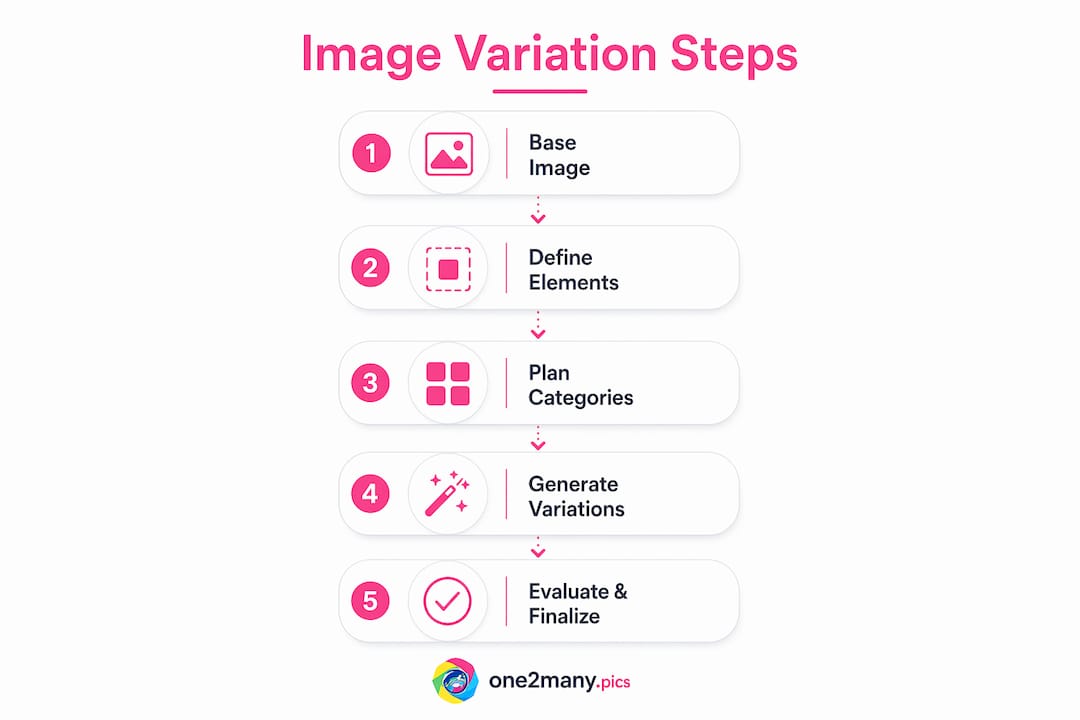
The core steps are: prepare a strong base image, define fixed and flexible elements, plan variation categories, generate outputs using AI or manual techniques, evaluate and refine selections, then export with platform-specific specifications and stripped metadata.
How many image variations should I create per category?
Research from Removedo recommends 3 to 5 individual outputs per variation category, organized across 5 to 7 defined themes. This produces a focused, deployable set without generating unmanageable volume.
What is the best AI method for preserving product identity in variations?
Image-to-image workflows provide stronger identity preservation than text-prompt-only generation, because the AI anchors to your actual subject rather than interpreting a written description of it.
How do I avoid content suppression when posting image variations?
Strip all metadata including location, device, and timestamp data from every file before posting. Use a platform like One2many to generate unique image fingerprints, which prevents duplicate detection algorithms from flagging near-identical content across accounts.
How many impressions do I need to test image variation performance?
A minimum of 1,000 impressions per variation is the recommended threshold for statistically significant A/B testing results. Drawing conclusions from smaller sample sizes produces unreliable performance data.