

Scaling social media visual output means producing multiple unique, platform-ready visuals rapidly from a single creative session, using AI-powered workflows to maintain brand consistency without adding headcount. The industry term for this approach is "one-to-many content production," and it has become the standard method for agencies and creators managing content across Instagram, TikTok, LinkedIn, and Pinterest simultaneously. A single AI-driven creative session yields 10–20 distinct assets from just 2–3 creative directions. That volume would take a traditional design team days to produce manually.
How to scale social media visual output with AI tools
The core technologies behind visual content scaling are generative AI, subject-aware cropping, and automated multi-format assembly. Each solves a different bottleneck in the production pipeline.
Generative image expansion is the most impactful shift from traditional workflows. Instead of manually resizing a hero image for each platform, AI fills in the extended canvas area with contextually accurate pixels. This technique, called generative pad, preserves subject integrity across aspect ratios from 9:16 for Stories to 1.91:1 for LinkedIn banners. The result is a set of platform-specific visuals that all feel like they belong to the same campaign.

Subject-aware zero-cut scaling goes one step further. The AI zooms out the source image to fit the target aspect ratio fully, then generates the surrounding background to fill the frame. No subject gets cropped. No awkward composition. This matters most for product shots and portraits, where cropping a face or product edge destroys the visual's purpose.
Professional social media management platforms that integrate AI can generate complete post variations including visuals, captions, and hashtags in under 5 minutes per run. That speed changes the economics of content production entirely. A single creator can now produce what previously required a three-person team.
| Workflow type | Time per asset | Platforms covered | Human input required |
|---|---|---|---|
| Manual design | 45–90 minutes | 1 at a time | High |
| Template-based tools | 10–20 minutes | 2–3 with resizing | Medium |
| AI-driven workflow | Under 5 minutes | All major platforms | Low |
Pro Tip: When evaluating AI visual tools, prioritize platforms that handle aspect ratio conversion natively. Tools that require manual export steps for each platform format will cancel out most of the time savings.
Step-by-step AI workflow for visual content creation
A repeatable workflow is what separates creators who scale from those who stay stuck at three posts per week. The following process builds on the one-to-many production model.
-
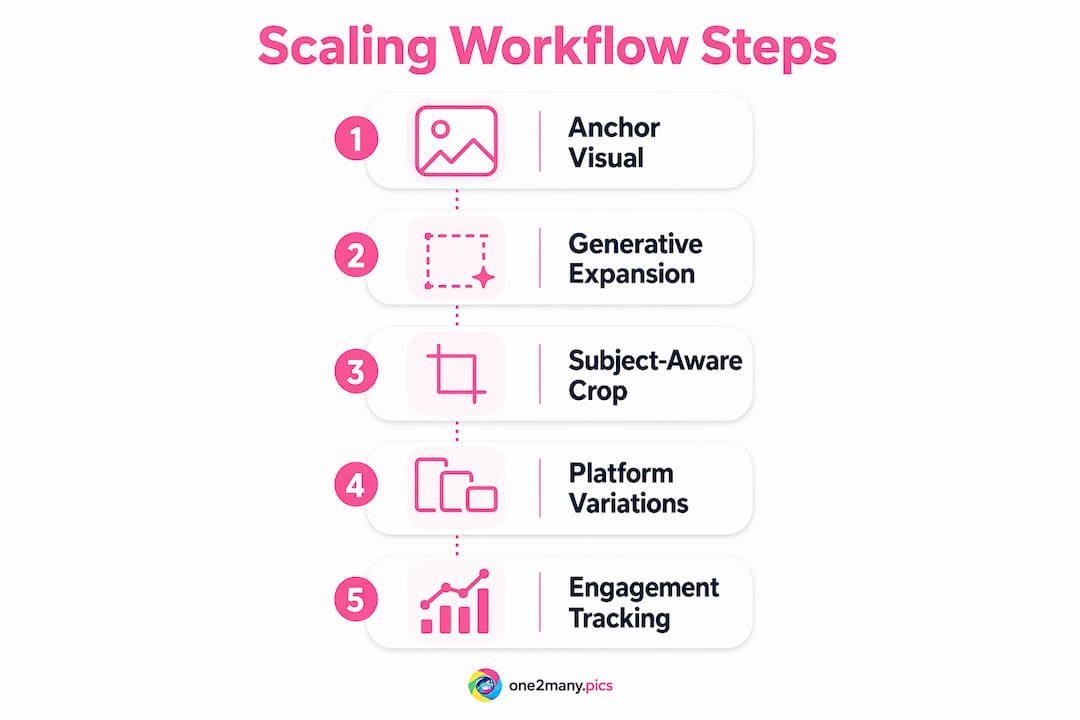
Start with one anchor visual. Choose or generate a single hero image that defines the campaign's color palette, subject, and mood. Starting with one hero image ensures all downstream assets share a unified creative foundation. Skipping this step produces a disjointed set of visuals that confuse audiences across platforms.
-
Generate 2–3 creative directions. Feed the anchor visual into your AI tool and generate a small set of distinct directions. Each direction should vary in tone or layout, not in brand identity. This gives you creative range without losing consistency.
-
Expand each direction into platform formats. Use generative pad or subject-aware scaling to produce platform-specific versions of each direction. A single direction typically yields assets for Instagram Feed, Stories, TikTok, LinkedIn, and Pinterest without any manual resizing.
-
Automate captions and hashtags. AI post generators tailor captions and hashtags to each platform's format constraints and campaign goals. LinkedIn copy reads differently than TikTok copy. Automating this step removes the most time-consuming part of multi-platform publishing.
-
Apply metadata removal and visual variation. Before exporting, strip location data, device info, and timestamps from each file. Apply minor visual variations to each asset so no two files are pixel-perfect duplicates. This step protects your digital footprint and reduces the risk of content suppression.
-
Export and schedule. Download your full asset set and load it into your scheduling tool. With agentic AI workflows, a single creator can publish dozens of posts per week without increasing team size.
Pro Tip: Never skip the anchor visual step to save time. Creators who generate assets platform-by-platform without a shared hero image spend more time on revisions than they save on production.
The most common workflow mistake is generating too many creative directions in one session. Three directions with full platform coverage beats ten directions with incomplete exports every time. Decision overload slows publishing, and half-finished asset sets never get posted.
Best practices for originality and privacy when scaling visuals
Visual privacy and originality are maintained by generating unique base images and applying platform-specific variations instead of repeating identical assets. Posting the same file across multiple accounts or platforms creates a detectable digital fingerprint. Platforms use image hash matching to identify duplicate content, and repeated matches can trigger content suppression or shadowbanning.
The fix is variation at the source, not just at the caption level. Adjust color temperature, crop position, or overlay text between versions. These changes are invisible to audiences but register as distinct files to platform algorithms. For creators managing multiple accounts, this practice is not optional. It is the difference between consistent reach and invisible posts.
Legal and ethical considerations also apply. Images generated with AI tools may carry licensing terms that restrict commercial use or require attribution. Always verify the output license before publishing branded content at scale. For images featuring real people or locations, confirm that no identifiable data is embedded in the file metadata.
Privacy safeguards to apply before every export:
- Remove EXIF metadata including GPS coordinates, device model, and capture timestamp
- Apply at least one visual variation per platform version (crop shift, color grade, or text overlay)
- Avoid reusing the same file hash across multiple accounts
- Use secure download channels that do not log file access history
- Confirm AI-generated images carry a commercial-use license before publishing
Balancing privacy and engagement requires treating each platform version as a distinct asset, not a copy. Creators who build this habit into their export workflow protect themselves from platform penalties while maintaining the volume needed to grow.
Pro Tip: Run a reverse image search on your hero visual before publishing. If the AI tool trained on public images, your "original" asset may already exist elsewhere online.
Troubleshooting common visual scaling challenges
Even well-planned workflows hit friction points. The table below maps the most common issues to their fixes.
| Common issue | Root cause | Fix |
|---|---|---|
| Subject cropped in platform version | Crop-and-zoom resizing | Switch to subject-aware zero-cut scaling |
| Inconsistent brand feel across assets | No anchor visual defined | Start every campaign with one hero image |
| Caption tone mismatched to platform | Generic copy applied to all formats | Use platform-specific AI caption generation |
| Duplicate content flagged by platform | Same file exported to multiple accounts | Apply visual variation and metadata removal before export |
| Creative decision overload | Too many directions generated at once | Limit to 2–3 directions per session |
Subject-aware zero-cut scaling solves the most common technical failure in visual scaling. Traditional crop-and-zoom resizing cuts off subjects when converting from landscape to portrait formats. Generative AI fills the extended space instead of cropping, preserving the full subject in every format. This matters most for product photography and headshots, where composition is non-negotiable.
Metric tracking is the final piece most creators skip. Engagement rate per platform, reach per asset format, and save rate on carousels all tell you which visual directions are working. Without this data, you are scaling blind. Track at least two metrics per platform per campaign cycle, then feed the results back into your next anchor visual decision.
Marketing agencies that adopt AI-driven content workflows report significant gains in output volume without proportional increases in staffing costs. The efficiency gain is real, but only when the workflow includes both automation and a feedback loop from performance data.
Key Takeaways
Scaling visual content production requires a one-to-many workflow built on a single anchor image, AI-driven format expansion, and consistent privacy controls applied before every export.
| Point | Details |
|---|---|
| Start with one anchor visual | A single hero image keeps all platform versions visually consistent and on-brand. |
| Use generative pad for resizing | AI fills extended canvas areas instead of cropping, preserving subjects across all aspect ratios. |
| Automate captions per platform | Platform-specific AI copy generation removes the most time-intensive manual step in publishing. |
| Apply variation before export | Unique file hashes per platform version prevent duplicate detection and content suppression. |
| Track metrics to refine output | Engagement and reach data per format should feed directly into the next campaign's anchor visual. |
What one-to-many production actually changes
The framing most creators get wrong is treating AI as a speed tool. It is actually a scope tool. Before AI-driven workflows, a solo creator could realistically manage one platform well. With a proper one-to-many pipeline, that same creator manages five platforms with higher output volume and better consistency than a small team achieved manually.
The anchor visual concept is underused. Most creators jump straight to platform-specific production and wonder why their feed looks inconsistent. The anchor visual is not just a design choice. It is a decision-making filter. Every downstream asset either fits the anchor or gets cut. That discipline is what makes scaled content look intentional rather than scattered.
Privacy as a competitive advantage is still underappreciated. Creators who strip metadata and apply visual variation before publishing are not just protecting themselves from shadowbanning. They are building a content library that can be redeployed across campaigns without leaving a traceable pattern. That reusability compounds over time. A well-managed asset library from six months ago can fuel a new campaign today with minimal rework.
The next shift worth preparing for is scalable content through AI strategies that adapt not just format but creative tone based on real-time performance signals. The tools exist today in early form. Teams that build the habit of performance-driven iteration now will have a significant head start when those tools mature.
— one2many.pics
One2many: built for creators who post at volume
Creators and agencies who need to produce dozens of platform-ready visuals per week without exposing their digital footprint have a specific set of requirements. One2many addresses all of them in one place.
The One2many platform transforms original images into multiple unique versions by removing metadata and generating visual variations through image spoofing. Each exported file carries a distinct hash, a clean metadata record, and platform-specific visual adjustments. The upload process is direct, the variation settings are configurable, and the downloads are secure. Subscription plans cover everything from single-image privacy to bulk visual processing with workflow integrations for agencies managing multiple accounts. If you post at volume and care about staying visible, One2many is where that workflow lives.
FAQ
What does it mean to scale social media visual output?
Scaling social media visual output means producing multiple unique, platform-ready visuals from a single creative session using AI-driven workflows. The goal is higher volume and consistency without proportional increases in time or team size.
How many assets can one AI session produce?
A single AI-driven creative session typically yields 10–20 assets from 2–3 creative directions. That volume covers all major platforms from one brief.
Why does metadata removal matter when scaling visuals?
Metadata embedded in image files includes GPS coordinates, device model, and timestamps. Posting files with this data across multiple accounts creates a traceable digital fingerprint that platforms can use to flag or suppress content.
What is subject-aware scaling and why does it matter?
Subject-aware scaling uses AI to fill extended image areas with generated pixels instead of cropping the subject. It preserves composition integrity when converting a single image to multiple aspect ratios across platforms.
How do I prevent duplicate content flags when posting the same visual across accounts?
Apply at least one visual variation per account version and remove EXIF metadata before export. Unique base images with distinct file hashes prevent platform algorithms from flagging your content as duplicate.