

Most social media managers don't have a creativity problem. They have a logistics problem. If you've ever spent 45 minutes manually publishing the same post across four platforms, you already understand why automate content posting has become one of the most searched topics in digital marketing. Automation doesn't strip the human out of your content strategy. It does the opposite: it frees you to think, create, and engage while systems handle the repetitive work. This guide breaks down exactly how content posting automation works, what you gain from it, and how to do it without your brand sounding like a bot.
Table of Contents
- Key takeaways
- Why automate content posting in the first place
- The real benefits of automating content posting
- Keeping it human: authenticity and automation
- How to implement automation workflows that actually scale
- Common pitfalls when automating content
- My take on automation and human judgment
- Take your content workflow further
- FAQ
Key takeaways
| Point | Details |
|---|---|
| Automation reduces daily workload | Scheduling tools publish across platforms automatically, cutting hours of repetitive manual work each week. |
| Consistency builds audience trust | Regular, predictable posting cadence signals reliability and keeps audiences engaged over time. |
| The 80/20 rule preserves authenticity | Combine roughly 80% scheduled posts with 20% live engagement to stay genuine without burning out. |
| Workflows go beyond scheduling | True content automation connects planning, creation, approvals, and analytics into one connected pipeline. |
| Avoid the "set and forget" trap | Automation requires ongoing monitoring and community management to stay effective and avoid robotic perception. |
Why automate content posting in the first place
Manual posting at scale is a grind that quietly kills productivity. You draft the content, resize it for each platform, write platform-specific captions, log into each account, post at the right time, and then repeat the entire cycle again tomorrow. For a solo creator managing two channels, it's tedious. For an agency managing twenty accounts, it becomes practically unmanageable without systems.
Content posting automation replaces that cycle with predefined, rules-based publishing. You load content into a scheduler, set the timing and channels, and the system takes it from there. The repetitive tasks get automated, including cross-platform publishing, optimal time targeting, and queue management, so your team doesn't have to touch each post manually every single day.
The core functions of a modern automation setup include:
- Scheduling and auto-publishing: Posts are queued in advance and published at preset times, often optimized by platform-specific algorithms.
- Multi-channel management: One dashboard handles publishing to Instagram, LinkedIn, TikTok, X, and more simultaneously.
- AI-assisted content enhancement: Many tools now suggest hashtags, recommend caption edits, and flag underperforming content formats.
- Event-driven triggers: Some systems fire posts automatically based on lifecycle events, like sharing a blog post the moment it goes live on your site.
Pro Tip: Set up event-driven triggers for your content launches so your social posts go live the exact moment your article or product page publishes. This eliminates the coordination gap that causes most delayed launches.
The real benefits of automating content posting
Time savings are the headline, but they're not the whole story. Understanding the full value helps you build a case for automation inside your organization and set realistic expectations for what it delivers.
You get hours back every week
Scheduling tools save hours weekly by batching creation and cutting the constant context-switching between platforms. Instead of logging in and out of six accounts, you work in one place and push content everywhere at once. Content marketing automation tools can save 2 to 3 hours per user weekly just from eliminating manual handoffs and coordination between team members.

Consistency becomes a structural advantage
Posting consistently is one of the highest-leverage things you can do for an audience. Consistent posting helps audiences know exactly what to expect from you, and that predictability builds trust. When your posting cadence relies on a human remembering to publish each day, it breaks the moment that person gets sick, distracted, or overwhelmed. Automation makes consistency a system, not a personal habit.
Multi-channel reach without multi-channel chaos
A content automation setup lets you manage cross-platform posting from a single workflow without multiplying the labor. You create once and distribute across channels with platform-specific customizations baked in. That's the content scheduling advantage most marketers underestimate until they're managing more than three channels at once.
Analytics feed back into better decisions
Most scheduling platforms come with built-in analytics. You see which posts drove clicks, what times generated the most engagement, and which formats resonated on which platforms. Over time, that data stops being a report and starts being a feedback loop that makes every future campaign sharper.
Here's why the numbers matter when you're building an internal case for automation:
- Reduced platform-switching saves measurable time that compounds across your team.
- Consistent posting cadence correlates directly with higher follower retention rates.
- AI-assisted scheduling targets peak activity windows your manual guesses would miss.
- Integrated analytics eliminate the need for separate reporting tools and manual data pulls.
- Automated approval workflows cut revision cycles by removing email chains from the process.
Keeping it human: authenticity and automation
The biggest fear most social media managers have about automation is sounding robotic. It's a fair concern. Fully automating every interaction strips the spontaneity that makes social media worth following in the first place. The fix isn't less automation. It's smarter automation.
A scheduling strategy combining 80% automated posts with roughly 20% real-time engagement is the most practical framework for maintaining authenticity at scale. Your scheduled posts handle the volume and consistency. Your live touchpoints, replies, stories, and reactive content handle the personality.
Practical ways to keep automation from killing your brand voice:
- Customize content per platform. A LinkedIn caption and a TikTok caption for the same piece of content should not be identical. Write platform-native variations before scheduling.
- Schedule engagement windows. Block 15 to 30 minutes daily for genuine community management. Reply to comments, respond to DMs, and acknowledge mentions during that window.
- Leave room for reactive content. Keep 20% of your posting slots unscheduled so you can jump on trending topics, breaking news, or organic moments without disrupting your calendar.
- Audit your tone quarterly. Read your last 30 posts as if you're a first-time follower. If they feel formulaic, vary the content mix and adjust the scheduling ratio.
Pro Tip: Use your automation platform's pause feature before major news events or cultural moments. Scheduling content during a crisis or trending conversation you haven't accounted for is one of the fastest ways to damage brand perception.
You can find more context on managing the automated to live posting ratio in a way that protects both engagement and authenticity.
How to implement automation workflows that actually scale
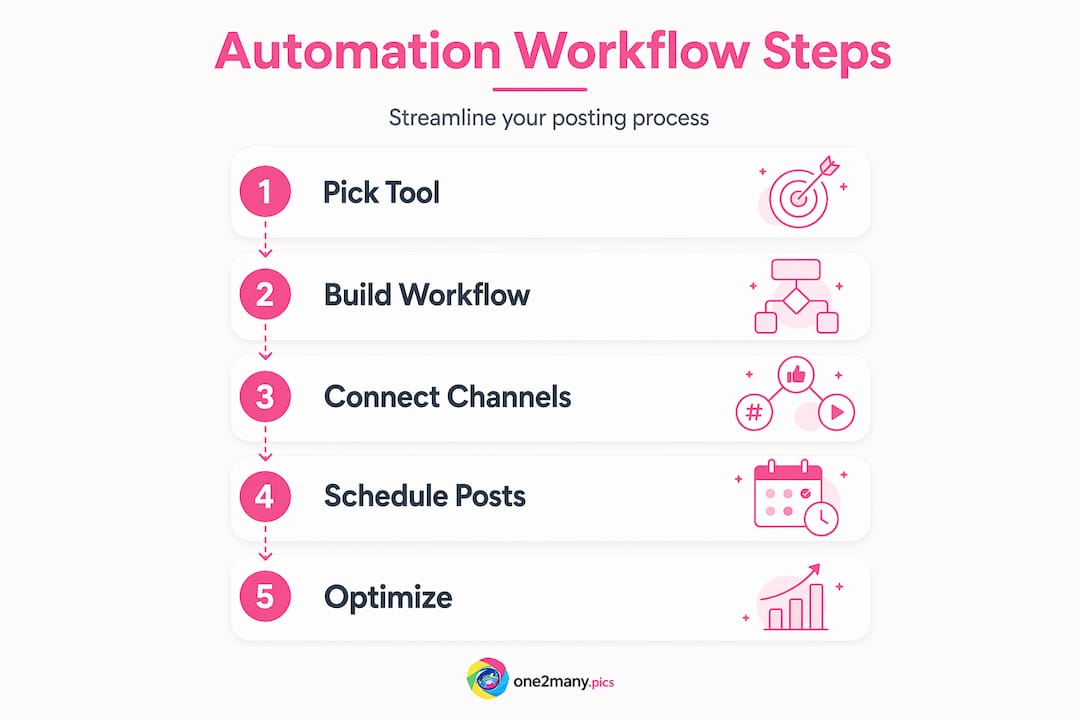
Picking a scheduling tool is step one. Building a workflow is the real work. True content management efficiency comes from connecting every stage of your content process, not just automating the final publish step.
Choose tools that fit your full workflow
The right automation platform supports multi-channel publishing, built-in analytics, approval routing, and integration with your existing tools. The table below shows what to compare when evaluating platforms:
| Feature | Why it matters |
|---|---|
| Multi-channel publishing | Publish once, distribute everywhere without duplicating effort |
| Approval routing | Removes email chains and speeds up compliance sign-offs |
| Analytics dashboard | Shows performance by channel, format, and time of day |
| AI content suggestions | Speeds up caption writing, hashtag research, and format choices |
| API and webhook support | Connects your CMS, DAM, or project management tools directly |
Build a connected content pipeline
Enterprise content workflow automation standardizes production by automating task assignments, deadline management, approvals, and publishing in sequence. Even if you're not an enterprise, the same principle applies: connect planning to creation to approval to publishing so nothing sits waiting in someone's inbox.
A practical implementation sequence looks like this:
- Map your current workflow from idea to live post and identify every manual handoff.
- Pick one automation platform that integrates with the tools your team already uses.
- Build if-then trigger rules: when a draft is approved, it moves to the scheduling queue automatically.
- Create modular content structures so each piece of content can be reformatted for different channels without starting from scratch.
- Set up automated analytics reporting weekly so performance data reaches decision makers without manual extraction.
Common pitfalls when automating content
Automation doesn't fix a broken strategy. It amplifies whatever you already have. That means the mistakes you make manually will happen faster and at greater scale once you automate them.
The most damaging pitfalls to watch for:
- Treating automation as set and forget. Automation requires monitoring and regular adaptation. Algorithms change, audience behavior shifts, and content formats evolve. A scheduling calendar built in January will need adjustment by March.
- Skipping community management. Failing to combine automation with live engagement leads to accounts that feel hollow. Followers notice when no one is home. Daily engagement windows of 15 to 30 minutes are the minimum to maintain a genuine presence.
- Posting at generic times. Most platforms now offer audience-specific peak time data. Ignoring it and scheduling everything at 9am is leaving engagement on the table.
- No approval workflow. Automating publishing without an approval gate means errors, off-brand content, and compliance issues reach your audience before anyone catches them.
Pro Tip: Run a monthly content audit on your automated posts. Pull the bottom 20% by engagement rate, identify the pattern, and adjust your scheduling rules or content templates accordingly. Automation compounds your wins, but only if you keep feeding it better inputs.
Understanding the role of automation in content management also means recognizing that good tooling alone doesn't create results. Strategy does.
My take on automation and human judgment
I've worked with creators and marketing teams who went all-in on automation and hit a wall. Not because the tools failed, but because they used automation to replace thinking rather than to support it. That's the distinction most guides gloss over.
What I've found consistently is that the teams getting the most out of their automation setups are the ones who treat it as an operations function, not a creative shortcut. The scheduling is automated. The analytics review is automated. The approval routing is automated. But the creative brief, the content angle, and the decision about what actually gets made are still deeply human. Eliminating coordination chaos lets those humans spend their energy where it counts.
The other thing I'd push back on: the idea that more automation equals less authenticity. In my experience, the opposite is true. When you're not burned out from logging into six platforms every morning, you actually have the energy and mental space to write a genuinely engaging caption or jump into a live comment thread. Automation gives you that back.
The teams that struggle are the ones who set up a publishing calendar and disappear. The ones who thrive set up the calendar and then show up inside it.
— one2many.pics
Take your content workflow further
If you're running content across multiple accounts or platforms and still doing the heavy lifting manually, the tools exist to change that today.

One2many is built for creators, social media managers, and agencies who need to scale visual content without leaving a digital footprint or triggering platform penalties. Beyond scheduling and workflow tools, One2many lets you transform original images into unique variations that strip metadata and avoid duplicate detection across accounts. That means you can distribute more content, across more channels, without the risk of shadowbanning or suppression eating into your reach. Explore One2many's platform to see how privacy-focused content automation fits into your existing workflow. Smarter distribution starts before the post goes live.
FAQ
What does content posting automation actually do?
Content posting automation uses scheduling tools and workflow systems to publish content across platforms automatically at preset times, replacing manual posting with rules-based systems that handle repetitive distribution tasks.
How much time can automation save per week?
Content automation tools save 2 to 3 hours per user weekly by eliminating manual handoffs, reducing platform-switching, and automating approval coordination.
Does automation make social media accounts feel less authentic?
Not when you apply the 80/20 framework. Scheduling about 80% of posts while reserving 20% for real-time engagement keeps accounts consistent and genuine without requiring constant manual attention.
What should I look for in a content automation tool?
Prioritize multi-channel publishing, built-in analytics, approval routing, and integration with your existing content management tools. AI-assisted suggestions for captions and scheduling times are a practical bonus.
How do I avoid the "set and forget" mistake?
Schedule monthly content audits, maintain daily engagement windows of 15 to 30 minutes, and build adaptive scheduling rules based on performance data rather than setting your calendar once and walking away.