

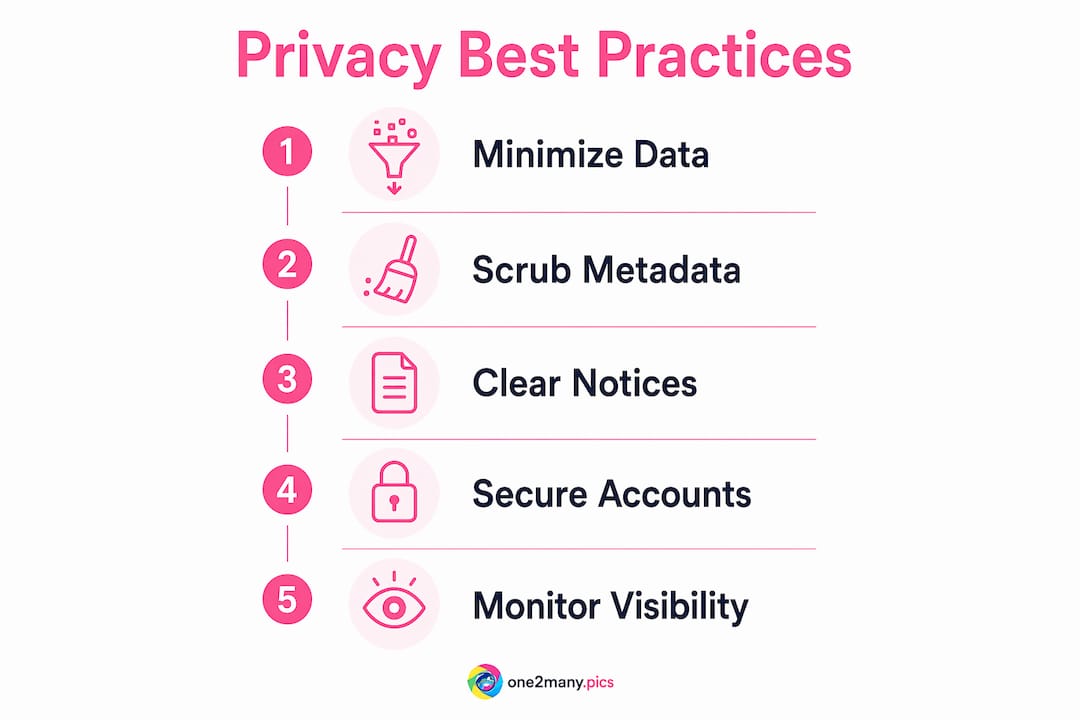
Content privacy best practices are the operational and technical safeguards creators, marketers, and agencies use to protect digital content from unauthorized access, data leaks, and platform suppression. These practices span data minimization, EXIF metadata removal, GDPR-compliant privacy notices, and multi-factor authentication (MFA). Without them, you risk exposing your audience's personal data, triggering shadowbanning filters, and violating regulations like CCPA/CPRA. The good news: privacy-first creator practices minimize risk upstream through data avoidance and direct consent, not just encryption. This guide covers every layer of protection you need in 2026.
What are the essential content privacy best practices for data minimization?
Data minimization is the practice of collecting only the information your specific service actually requires, and nothing more. A newsletter signup needs an email address and a consent checkbox. It does not need a phone number, job title, or behavioral segmentation tags that you have no immediate use for. Every extra field you collect is a liability you are choosing to carry.
The practical creator-privacy playbook recommends collecting only email and consent for newsletters, explicitly avoiding excess fields for segmentation that increase exposure without near-term value. That single discipline eliminates entire categories of breach risk before any technical control is even needed. If a data point does not directly serve the content or service you are delivering today, do not collect it.
This principle extends beyond forms. When you build audience segments in tools like Mailchimp or HubSpot, audit what fields you are actually using to trigger campaigns. Unused data sitting in a CRM is not neutral. It is a target. Governance that defines data collection and retention rules is the foundation of sustainable privacy, especially as AI-driven personalization creates pressure to collect more.
- Collect only the data fields your current service requires, not future hypothetical ones.
- Tie every data point to a specific, documented purpose before you add it to a form.
- Review your data collection points quarterly and delete fields you are not actively using.
- Avoid third-party enrichment tools that append data without explicit user consent.
Pro Tip: Treat consent language like product copy. Write it for the specific service, not as a legal catch-all. "We'll send you weekly photography tips" outperforms "We may use your data for marketing purposes" in both compliance quality and audience trust.
How does image metadata expose your location and device info?
Every image file you create carries embedded metadata that most creators never see. EXIF data records GPS coordinates, device serial numbers, and timestamps. IPTC fields store copyright and caption information. XMP profiles carry editing history. ICC profiles describe color space. Together, these layers can reveal where you were, what device you used, and when you shot the photo, all without you writing a single word.

The critical misconception is that uploading to Instagram, TikTok, or X automatically solves this. Platform-side stripping is inconsistent. EXIF metadata including GPS and device info often survives platform processing in certain file formats or when images are shared via direct message, email, or embedded in websites. You cannot rely on the platform to protect you.
The correct workflow is local scrubbing before upload. ExifTool is the most thorough command-line option. Its "-all=` flag removes all metadata fields in one pass. Simpler GUI tools exist, but many perform only partial removal. Partial removal, such as GPS-only stripping, leaves device serial numbers, timestamps, and embedded thumbnails intact. Those thumbnails carry their own EXIF data and are frequently overlooked.
| Metadata type | Privacy risk | Recommended removal method |
|---|---|---|
| EXIF (GPS, device, timestamp) | Reveals location, device identity, shooting time | ExifTool -all= flag or One2many local scrubbing |
| IPTC (copyright, captions) | Exposes creator identity and workflow details | Full metadata strip before distribution |
| XMP (editing history) | Discloses software, editing sequence, original file path | Strip via ExifTool or dedicated privacy tools |
| Embedded thumbnails | Carry independent EXIF data often missed by partial tools | Full strip only; verify with ExifTool read pass |
For a deeper look at protecting image metadata before you publish, the workflow principles apply across every platform you post to.
Pro Tip: After stripping metadata, run a verification pass with ExifTool in read mode to confirm zero residual fields. One missed embedded thumbnail has exposed creator locations in documented cases. Verify, do not assume.
What legal requirements apply to privacy notices and user rights?
GDPR Article 13 requires that you provide a privacy notice at the exact moment you collect personal data, not buried in a footer link. That notice must include your identity and contact information, the legal basis for processing, how long you retain data, the rights available to the person, and whether any automated decision-making applies. Boilerplate language copied from a template does not satisfy this requirement if it does not describe your actual processing activities.
GDPR Article 13 mandates clear privacy notices at data collection points, detailing processing purposes, retention periods, and data subject rights. For creators running newsletters, lead magnets, or community platforms, this means your signup form needs a linked notice that describes exactly what you do with that email. "We use your data to improve your experience" is not a legal basis. "We send weekly content tips and retain your email until you unsubscribe" is.
Under CCPA/CPRA, the right-to-delete process is equally specific. Deletion confirmation is required within 10 days and permanent deletion across all systems and third-party processors must complete within 45 days of the request. The clock starts at receipt, not at verification. This means your deletion workflow must reach every tool in your stack: your ESP, your CRM, your analytics platform, and any data enrichment vendors you use.
Must-have elements for a compliant privacy notice:
- Your name and contact details as the data controller.
- The specific purpose for each type of data you collect.
- The legal basis for processing (consent, legitimate interest, contract).
- Retention periods stated in plain language, not vague terms like "as long as necessary."
- Clear instructions for exercising rights: access, correction, deletion, and portability.
- A list of third-party processors who receive the data.
For a practical overview of social media compliance requirements that apply to creators specifically, the platform-level obligations add another layer to these baseline legal requirements.
How can creators protect their content from shadowbanning and suppression?
Shadowbanning is the practice of reducing a creator's content visibility without issuing a formal enforcement notice. Your posts appear to exist, but reach drops sharply and new audiences cannot find you. The defining feature of shadowbanning is that it is invisible by design. You do not receive a notification, and in most cases, there is no appeal path.
Platform-specific suppression filters are generally unappealable when they are automated and unlabeled. Only enforcement actions that generate a formal record, such as a policy violation notice, carry an appeal mechanism. This distinction matters because it changes your response strategy entirely. If you receive a labeled enforcement action, appeal it with documented evidence. If you suspect automated filtering, your only path is behavioral correction and patience.
Diagnosing the cause requires detailed account logs. Maintaining account change logs helps you identify whether a reach drop followed a specific post, a hashtag pattern, a posting frequency change, or an account setting modification. Without that log, you are guessing.
Proactive steps to reduce suppression risk:
- Post consistently within platform-recommended frequency ranges rather than in bursts.
- Avoid recycling identical image files across multiple accounts or posts without variation.
- Review platform community guidelines every quarter, as enforcement criteria shift.
- Use platform-native scheduling tools rather than third-party automation where possible.
- Monitor reach metrics weekly so you catch drops early rather than after significant damage.
What operational security measures protect your accounts and content?
Multi-factor authentication is the single most effective account protection measure available to creators, and it costs nothing to implement. Enable MFA on every platform where you publish, every tool that stores audience data, and every service that has access to your payment information. Authenticator apps like Google Authenticator or Authy are more secure than SMS-based codes, which are vulnerable to SIM-swapping attacks.
Beyond MFA, monitoring matters. Set up login alerts, password reset notifications, and export alerts on every platform that offers them. A shared alert inbox for team accounts means no single person is the only one watching. When an alert fires at 2 a.m., someone needs to see it.
Breach response requires a documented plan before you need it. The core steps are containment first (disable the compromised account or revoke access), then notification (inform affected users within the timeframe your jurisdiction requires), then prevention (audit how the breach occurred and close the gap). Creators who have never written this plan down tend to improvise badly under pressure, which compounds the damage.
- Enable MFA on every platform, tool, and service in your content stack.
- Create a shared monitoring inbox for security alerts across all team accounts.
- Document a breach response plan: containment, notification, and prevention steps.
- Conduct a privacy audit every six months covering data collection, access controls, and vendor contracts.
- Review third-party tool permissions annually and revoke access for tools you no longer use.
Pro Tip: Schedule your privacy audit the same way you schedule an editorial calendar review. Put it in the calendar as a recurring event every six months. Treat it as a workflow check, not a legal exercise, and it actually gets done.
Key takeaways
Content privacy best practices require data minimization, local metadata removal, legally compliant privacy notices, and documented operational security to protect creators from both regulatory risk and platform suppression.
| Point | Details |
|---|---|
| Minimize data collection | Collect only what your current service requires; unused data is a liability, not an asset. |
| Strip metadata locally | Use ExifTool or One2many to remove all EXIF, IPTC, and XMP fields before uploading any image. |
| Write specific privacy notices | GDPR Article 13 requires notices tied to your actual processing activities, not generic boilerplate. |
| Log account changes | Detailed logs help diagnose shadowbanning causes and support appeals for labeled enforcement actions. |
| Implement MFA and breach plans | Multi-factor authentication and a documented incident response plan are non-negotiable for account security. |
Why privacy is now a creator's core operating discipline
Most creators treat privacy as something they will "get to eventually," usually after a scare. That mindset is expensive. After working with content teams across social media and agency workflows, the pattern is consistent: the creators who build privacy into their production process from the start spend far less time on damage control and far more time on growth.
The uncomfortable truth is that technical controls alone do not protect you. Encryption does not help if you collected data you should never have had. Platform-side metadata stripping does not protect you if you emailed the original file to a client first. The best privacy is upstream design: decide what you will not collect, what you will not store, and what you will not share before you build the workflow.
Creators who communicate their privacy practices clearly to their audiences also build measurably stronger trust. Audiences notice when you are specific about what you do with their data. That specificity is a competitive advantage, not just a compliance checkbox. The creators who will thrive in 2026 are the ones treating privacy as a signal of professionalism, not a burden.
— one2many.pics
Protect your content privacy with One2many
If metadata removal and content variation are part of your privacy workflow, One2many handles both in one place.

One2many strips EXIF, IPTC, and XMP metadata locally before your images leave your workflow, so GPS coordinates, device serial numbers, and timestamps never reach the platform. The tool also generates unique visual variations of your images, which reduces duplicate detection risk across accounts and platforms. For creators managing multiple accounts or agencies running content at scale, the visual content privacy tools at One2many remove the manual steps that most teams skip under deadline pressure. Start protecting your content at one2many.pics.
FAQ
What is the fastest way to remove metadata from images?
ExifTool with the -all= flag removes all metadata fields from an image file in a single command. One2many automates this process for creators who need bulk processing without command-line workflows.
Does uploading to Instagram or TikTok remove all metadata?
Platform-side stripping is inconsistent and does not cover all file formats or sharing methods. Strip metadata locally before uploading to guarantee complete removal.
What is shadowbanning and can you appeal it?
Shadowbanning is automated visibility suppression with no formal notification. Only labeled enforcement actions with a documented policy violation carry an appeal path; automated filters generally do not.
What does GDPR Article 13 require from content creators?
GDPR Article 13 requires a privacy notice at the point of data collection that specifies your identity, processing purpose, legal basis, retention period, and the rights available to the person providing data.
How quickly must you respond to a CCPA deletion request?
You must confirm receipt within 10 days and complete permanent deletion across all systems and third-party processors within 45 days of the original request.