

That photo you posted last Tuesday? It may have quietly revealed the city block where you live, the phone model you use, and the exact time you took the shot. Not from anything visible in the image itself, but from the metadata buried inside the file. This guide to visual content privacy exists because most creators have no idea how much information travels with their images. Privacy in visual media is not just about blurring faces. It covers metadata, identifiable background details, legal consent obligations, and platform behaviors that can work against you. Here is everything you need to know to protect yourself and your audience.
Table of Contents
- Understanding privacy risks in visual content
- Privacy-preserving techniques for visual content
- Beyond face blurring: comprehensive anonymization essentials
- Legal requirements and operationalizing consent withdrawal safeguards
- Practical workflow and tool recommendations for creators and teams
- Why privacy-by-design in visual content creation is the future standard
- Enhance your visual content privacy with one2many.pics tools
- Frequently asked questions
Key Takeaways
| Point | Details |
|---|---|
| Metadata risks | Photos contain hidden metadata like GPS coordinates that can expose your location and identity. |
| Comprehensive anonymization | Face blurring alone is not enough; obscure all identifying elements including background and metadata. |
| Consent withdrawal compliance | Creators must track consent and delete related data promptly when consent is withdrawn. |
| Privacy-by-design | Integrate privacy steps early in workflows rather than as a last-minute fix to avoid data leaks. |
| Local processing tools | Use client-side tools to strip metadata and anonymize images before uploading to protect privacy effectively. |
Understanding privacy risks in visual content
Visual content carries far more personally identifiable information than most creators realize. The obvious risks get all the attention: someone's face in the background of a photo, a street sign you forgot to crop out. But the deeper risks are invisible to anyone looking at the image.
Embedded metadata is the biggest blind spot. Every photo taken on a smartphone or DSLR contains EXIF data (short for Exchangeable Image File Format, a hidden layer of technical info stored inside the image file). This data routinely includes:
- GPS coordinates accurate to within a few meters
- The device make and model used to take the photo
- The exact date and time of capture
- Camera settings like aperture, shutter speed, and ISO
- Sometimes even a small embedded thumbnail of the original, unedited image
Beyond metadata, faces are the most legally significant identifier in any image. Publishing someone's face without their consent can expose you to legal liability, and the legal ground shifts if that consent is later withdrawn. Under GDPR Article 7, if a person withdraws their consent, you must delete all personal data processed under that consent. That means the image, any cached versions, and any copies you've stored.
"Organizations must be able to demonstrate that the data subject has given consent, and where consent is withdrawn, personal data must be deleted without undue delay unless another lawful basis applies."
You also need to think past faces. Tattoos, birthmarks, distinctive clothing, and even gait patterns can make someone identifiable in footage. For a deeper look at these layered risks, image privacy protection for creators breaks down the specific scenarios that trip up social media professionals most often.
Privacy-preserving techniques for visual content
With these risks in mind, here are concrete techniques to protect your content's privacy. Think of this as your core toolkit for visual content privacy methods that actually hold up.
Step-by-step pre-upload process:
- Strip EXIF metadata from every image before uploading. Tools that run locally in your browser are best because your file never leaves your device.
- Identify every person in the image. Confirm you have valid, documented consent for each.
- Blur or pixelate any non-consenting faces or identifying features.
- Inspect the background carefully for location clues: street names, building numbers, license plates, or branded storefronts.
- Run the cleaned file through an EXIF viewer to confirm all sensitive metadata has been removed.
- Save the final, cleaned file under a new name to avoid accidental upload of the original.
A practical workflow for creators confirms that stripping EXIF data, pixelating non-consenting faces, and auditing background details are the three core steps every privacy-focused creator should follow before sharing any image.
One distinction that matters: blur vs. pixelation. Light Gaussian blur can sometimes be reversed with AI-powered sharpening tools, which means it offers weaker protection than most people assume. Pixelation, which replaces facial detail with solid color blocks, is significantly harder to reverse and is therefore the stronger choice for anonymizing faces.

| Technique | Reversibility | Privacy strength | Best use case |
|---|---|---|---|
| Gaussian blur | Moderate | Medium | Low-stakes content |
| Pixelation | Low | High | Faces, plates, addresses |
| Solid color fill | Very low | Very high | Sensitive identifiers |
| Cropping | None | Highest | Removing content entirely |
Pro Tip: Process images in your browser using a client-side tool whenever possible. Client-side tools never upload your original file to a server, which means your raw metadata and unedited image stay on your device. This is the single most effective privacy step many creators skip.
For a full breakdown of the anonymization process, how to anonymize images safely walks through each tool category and where they fit in a real workflow.
Beyond face blurring: comprehensive anonymization essentials
To achieve true privacy, you need to look beyond face blurring to all potential identifiers. This is the part of any visual data protection guide that most articles skip.
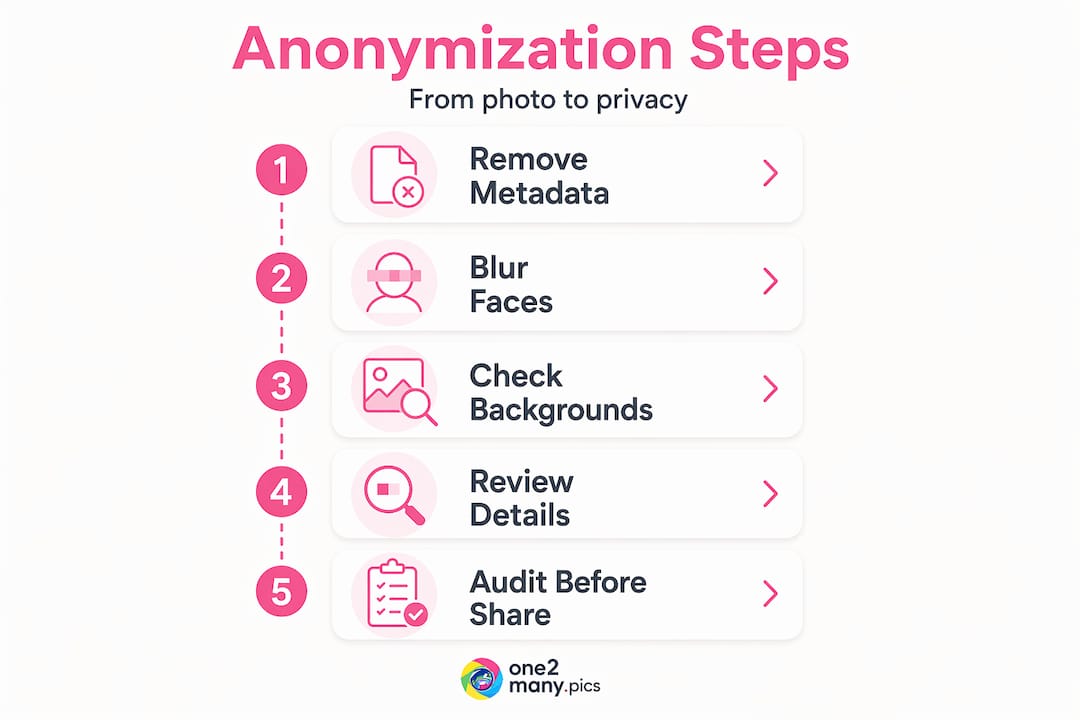
Complete anonymization must address faces, license plates, unique personal items, location cues, and all metadata layers to prevent identification and satisfy GDPR requirements. That covers a lot of ground.
Here is a breakdown of identification vectors that creators routinely overlook:
- License plates: Visible in any outdoor or parking area photo. Even a partial plate can be traced.
- Tattoos: Highly distinctive and legally considered a personal characteristic in several jurisdictions.
- Distinctive clothing: Branded gear, uniforms, or uniquely identifiable outfits can identify people across multiple images.
- Background signage: Business names, street numbers, and transit maps can pinpoint a location to within a city block.
- Reflections: Windows, mirrors, and even sunglasses can reveal faces or locations not intended to be in the shot.
- Metadata types beyond EXIF: IPTC metadata (a second layer that stores caption, copyright, and creator info) and XMP data (a third layer often added by editing software) must also be stripped.
| Metadata type | What it stores | Risk level |
|---|---|---|
| EXIF | GPS, device, timestamp | High |
| IPTC | Creator name, copyright, caption | Medium |
| XMP | Edit history, software info | Medium |
| Embedded thumbnail | Unedited original image | High |
Pro Tip: After anonymizing an image, zoom in to 200 percent before posting. Identifiers that look fine at normal screen size, like partial text or reflected faces, often become visible at higher magnification.
Manual redaction is inconsistent. Even experienced editors miss things when working under time pressure. Automated tools that flag identifiers before you commit to a final export improve thoroughness and reduce the chance of human error. Build automation into your workflow, not just your intent. For further reading on the full scope of what needs protecting, protect your creative work covers the legal and practical angles together.
Legal requirements and operationalizing consent withdrawal safeguards
Beyond anonymization, complying with legal rules protects you and your audience. The legal landscape around visual content privacy has changed significantly in the past two years, and what was a best practice is now, in many cases, a legal obligation.
Under GDPR, withdrawal of consent must be as easy as giving it, and triggers deletion of all personal data processed under that consent unless another lawful basis exists. That sets a high operational bar for any creator working with images of other people.
In the US, the TAKE IT DOWN Act requires covered platforms to remove nonconsensual intimate visual depictions within 48 hours of a valid removal notice and to make reasonable efforts to find and remove identical copies. This is a fast-moving area of law, and the 48-hour window is strict.
Here is how to build a consent-tracking workflow that holds up:
- Assign every image a unique file hash (a digital fingerprint that identifies a specific file) at the point of creation.
- Link each signed consent form directly to the relevant file hashes in a searchable digital ledger.
- Record the scope of consent: what platforms, what uses, and any expiration dates.
- Set up a clear intake process for consent withdrawal requests, with a defined response time.
- Upon withdrawal, locate all exports and copies tied to that file hash and delete them.
"Creators who fail to track the link between consent and individual assets will find it practically impossible to honor withdrawal requests at scale."
Key obligations to keep on your radar:
- Stop all consent-based processing immediately upon withdrawal
- Delete personal data tied to that consent unless another lawful basis applies
- Document the deletion for audit purposes
- Notify any third parties you have shared the content with
Your social media privacy guide for creators and brands covers how these obligations translate into daily platform management, particularly for teams managing multiple accounts.
Practical workflow and tool recommendations for creators and teams
Here is how to put it all together in a practical daily workflow for creators and social media teams.
Pre-upload checklist:
- Import image to a local editing environment (not a cloud tool)
- Strip EXIF, IPTC, and XMP metadata using a local tool
- Identify all persons in the frame and verify consent status
- Apply pixelation or solid fill to non-consenting faces and identifiers
- Audit the background for location cues, plates, and reflections
- Run the file through an EXIF viewer to verify clean output
- Save as a new file and delete the original from your upload queue
- Log the file hash and consent status in your asset ledger before publishing
A consent-linked asset ledger is essential for any workflow that needs to scale while honoring GDPR obligations. Without it, you are managing consent manually, which breaks down fast when you are handling dozens of images per week.
Ongoing team practices:
- Assign a privacy checkpoint role to at least one team member per campaign
- Run quarterly reviews of your asset ledger to catch outdated or withdrawn consents
- Use zoom inspection (200 percent or higher) as a standard final check before any post goes live
- Process all images locally using client-side tools to avoid sending raw files to third-party servers
- Schedule annual team training that covers both technical steps and legal updates
Pro Tip: Create a shared team template for your consent ledger using a simple spreadsheet with columns for file hash, subject name, consent date, platforms covered, and withdrawal status. It takes 20 minutes to set up and saves hours when an audit or withdrawal request arrives.
The image anonymization workflow resource expands on how to implement these steps efficiently across different team sizes, from solo creators to agency teams.
Why privacy-by-design in visual content creation is the future standard
Here is the part most guides on this topic miss entirely. Privacy protection in visual content is framed almost universally as a cleanup task. Something you do at the end, before you hit publish. That framing is the root cause of most privacy failures.
The real shift is treating privacy as a design constraint from the moment you pick up a camera or brief a photographer. Which angles reveal identifiable backgrounds? Which shoot locations eliminate license plate risk entirely? Which consent forms need to be signed before the shoot, not after? These decisions, made early, reduce the remediation work to almost nothing.
Many creators also over-rely on platform metadata stripping. Instagram, TikTok, and most major platforms do strip some EXIF data from uploaded images. But platform metadata stripping is not privacy-by-design. Platforms may retain your original file with full metadata internally, use it for their own purposes, or expose it in ways you did not anticipate. Pre-upload cleaning is the only method that gives you actual control.
There is also a real tension between privacy and content utility. Heavy anonymization can make images less engaging. A heavily pixelated street scene loses authenticity. The answer is not to skip anonymization but to plan shoots that do not require it. Choosing controlled environments, working with consenting subjects, and building privacy into your creative brief gives you images that are both compelling and clean.
The privacy-focused platforms discussion is worth reading here because it reframes the question. Privacy tools are not a restriction on creativity. They are what allow you to post confidently, consistently, and at scale without the background anxiety of not knowing what you left in the metadata.
Enhance your visual content privacy with one2many.pics tools
Protecting your visual content should not require a team of privacy engineers. One2Many.pics gives digital creators and social media managers a practical, privacy-first tool that strips metadata, generates unique image variations, and removes the digital fingerprints that get content flagged or traced back to you.

Whether you are managing a single account or scaling across multiple platforms, One2Many.pics handles the technical steps that most creators skip, including EXIF removal, visual variation, and local processing that keeps your original files off third-party servers. Pair the platform with the image anonymization guide for a complete picture of safe posting practices, and explore how to protect your creative work to understand the full scope of what you are protecting.
Frequently asked questions
What types of metadata should I remove to protect privacy in photos?
Remove GPS coordinates, timestamps, device model info, and embedded thumbnails from photo metadata to prevent location or identity leaks. Smartphone photos routinely include all of these, often without the photographer realizing it.
Is blurring faces enough to anonymize visual content?
No, blurring faces alone is insufficient. Comprehensive anonymization addresses multiple identification vectors including license plates, tattoos, background details, and all metadata layers.
How should creators handle consent withdrawal under GDPR?
Creators must immediately stop consent-based processing and delete all personal data tied to that consent. The GDPR consent withdrawal process must be as easy as the original consent was to give.
What is the TAKE IT DOWN Act and how does it affect content platforms?
The TAKE IT DOWN Act requires covered platforms to remove nonconsensual intimate visual depictions within 48 hours of a valid removal request and to make reasonable efforts to remove identical copies promptly.
Why is processing images locally with client-side tools recommended?
Client-side tools process images directly in your browser so files never leave your device, which means your original metadata and unedited content are never shared with a third-party server.