

A content workflow is defined as a structured, repeatable sequence of steps that moves a raw idea from concept to published piece and into performance measurement. Without this structure, content production becomes reactive, inconsistent, and impossible to scale. Teams with documented production workflows publish 3 to 5 times more articles monthly while reducing revision cycles. That single fact explains why content workflow basics are the foundation every creator and marketer needs before investing in tools, talent, or ad spend.
The industry term for this discipline is content operations, a broader category that includes workflow design, role definition, and governance. Content production workflow sits inside content operations as the execution layer. The Content Marketing Institute recognizes this distinction as central to scaling content programs without sacrificing quality.
What are the standard stages of a content workflow?
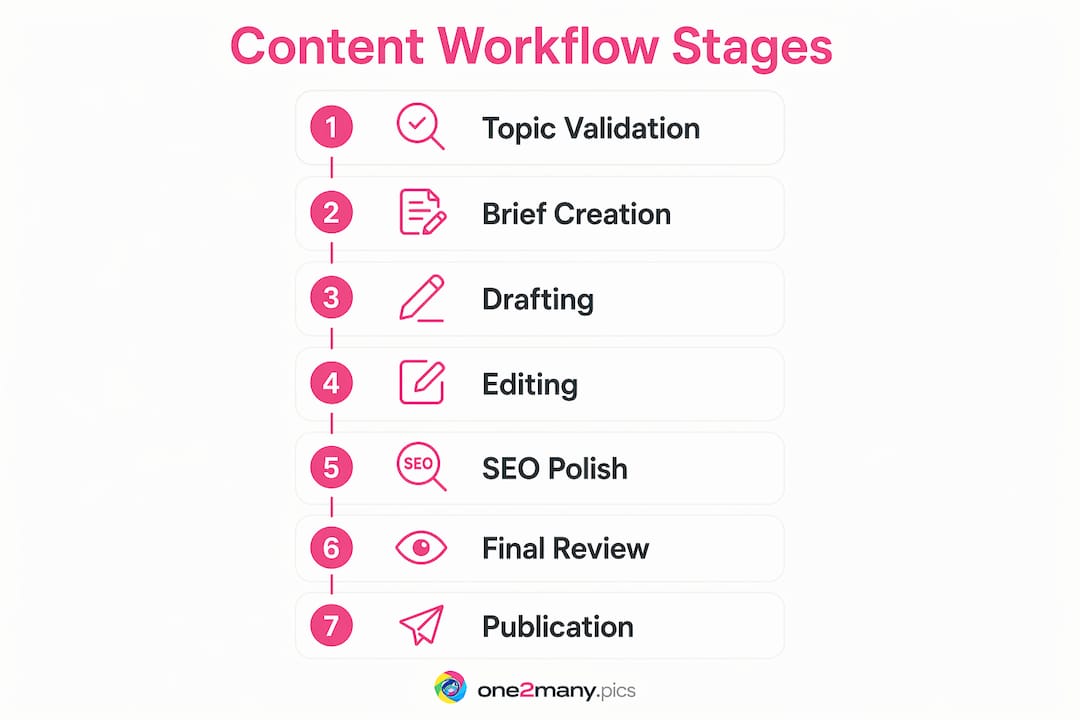
A standard content workflow consists of 7 linear stages, each with a defined output before the next stage begins. Skipping or blurring these stages is the primary reason content teams miss deadlines and publish inconsistent work.
-
Topic validation. Confirm the idea has search demand, audience relevance, and strategic fit. Output: an approved topic with a target keyword and audience intent confirmed.
-
Brief creation. Write a content brief that cover the angle, outline, word count, tone, internal links, and SEO requirements. A great content brief is the single source of truth that aligns all contributors before any creative work begins. Output: a signed-off brief.
-
Drafting. The writer produces a complete first draft against the brief. Output: a draft that meets the brief's structural and length requirements.
-
Editing. A dedicated editor reviews for clarity, accuracy, tone, and structure. This stage is the most common bottleneck because editing is often treated as a quick pass rather than a full review. Output: an edited draft with tracked changes resolved.
-
SEO polish. An SEO specialist or trained editor checks keyword placement, meta description, title tag, internal links, and image alt text. This stage is the second most common bottleneck, especially when SEO is treated as an afterthought. Output: an SEO-ready draft.
-
Final review. A stakeholder or editor-in-chief approves the piece for publication. Output: a fully approved file.
-
Publication and measurement. The piece goes live and enters a tracking system. Metrics such as organic traffic, time on page, and conversions are logged from day one. Output: a published URL with baseline performance data recorded.
AI tools can collapse stages 3 through 5 by generating drafts, suggesting edits, and running SEO checks in a single pass. AI-assisted workflow stages reduce production timelines and maintain brand consistency across high-volume output.
Pro Tip: Assign a single owner to each stage. When two people share ownership of one stage, accountability disappears and handoffs stall.
How does active monitoring keep your workflow from decaying?
Effective workflow management runs on a four-stage cycle: Model, Execute, Monitor, and Optimize. Most teams handle the first two well. They design a workflow, run it, and then stop paying attention. Skipping the monitoring phase is the most common reason workflows become obsolete within 6–12 months.
Monitoring means watching the workflow in real time, not just reviewing output quality after the fact. Here is what active monitoring looks like in practice:
- Track stage duration. If drafting consistently takes twice as long as planned, the brief is probably underspecified or the writer is unclear on scope.
- Flag stalled handoffs. A piece sitting in "editing" for five days signals either an overloaded editor or an unclear definition of what "ready to edit" means.
- Watch workload distribution. One overloaded role creates a bottleneck that slows every piece behind it in the queue.
- Log revision requests. High revision rates at the editing stage point back to a weak brief or a misaligned drafting process.
The most practical way to build monitoring into your routine is to add a two-minute workflow check to daily standups. Ask: what is stalled, who is overloaded, and what moved forward? Visible triggers and metrics in daily routines catch overloaded roles and stalled tasks before they become missed deadlines.
Optimization follows monitoring. When you spot a pattern, you change the process. If SEO polish consistently delays publication by three days, you either move SEO requirements into the brief stage or hire a dedicated SEO editor. The workflow adapts to the data.
Pro Tip: Schedule a 30-minute workflow review every four weeks. Review stage durations, revision rates, and publication volume. One small fix per cycle compounds into major efficiency gains over a quarter.
What are common pitfalls in content workflows and how do you avoid them?
Most workflow failures are predictable. They fall into a short list of recurring mistakes that creators and marketers repeat across industries and team sizes.
Confusing content operations with content production. Content operations covers governance, tooling, and team structure. Content production covers the execution of individual pieces. Mixing these two layers produces bloated processes where writers are asked to manage editorial calendars and strategists are pulled into copy reviews. Keep them separate.
Improvising around the workflow. When a team constantly finds workarounds, the workflow design is the problem, not the team. Constant improvisation signals a fundamentally flawed process. The fix is to map the actual process people follow, not the ideal process you wish they followed, and redesign from there.
Automating before mapping. Most teams build workflows directly inside software tools. Experts recommend mapping on paper first to avoid automating a broken process. A digital tool makes a bad workflow faster, not better.
Ignoring the scalability ceiling. Manual content pipelines hit a scalability wall around 15 articles per month. Beyond that volume, quality drops and burnout follows. Automation and clear handoffs are not optional at scale. They are structural requirements.
Treating the workflow as a static checklist. A workflow is a living system. Teams that set it once and never revisit it find it drifts from reality within months. Pair your workflow with a regular review cycle to keep it accurate and effective.
Avoiding these pitfalls requires honest observation. Watch what your team actually does, not what the process document says they should do. The gap between those two things is where your next improvement lives.
How do you build and improve a content workflow in practice?
The most effective approach starts analog. Before opening any project management tool, map your workflow on a whiteboard or sheet of paper. Write every step your team currently takes, including the informal ones. This reveals the real process, including the workarounds and gaps that a clean process diagram hides.
Define "done" for every stage
Each stage needs a clear exit criterion. "Done" for drafting means the piece meets the brief's word count, covers all required sections, and includes placeholder links. "Done" for editing means all tracked changes are resolved and the piece reads at the target grade level. Without these definitions, handoffs become judgment calls, and judgment calls create delays.
Use a content brief as your anchor
The content brief prevents rework. A complete brief covers the target keyword, audience intent, outline, tone guidelines, internal link targets, and the definition of success for that piece. When every contributor works from the same brief, the number of revision cycles drops significantly. Think of the brief as the contract between strategy and execution.
Integrate AI at the right stages
AI integration at multiple workflow stages can collapse traditionally siloed production steps, accelerating output and consistency. Use AI for first-draft generation, SEO checks, and meta description writing. Reserve human judgment for editing, final review, and strategic decisions. This split keeps quality high while cutting production time.

For creators managing visual content across platforms, tools like One2many add another layer of workflow efficiency. One2many processes images to remove metadata and generate unique visual variations, which supports bulk posting without triggering duplicate detection or platform penalties. That kind of automation fits cleanly into the publication stage of any content workflow.
Pro Tip: Build a content repurposing step into your workflow. Repurposing content from a single piece into multiple formats multiplies output without multiplying production effort.
Treat the workflow as a living document
Schedule a workflow review every four weeks. Compare planned stage durations against actual durations. Identify the one stage causing the most delay and fix it. One targeted improvement per cycle is more effective than a full workflow redesign every six months. For deeper context on managing content at scale, the guide on scalable posting strategies covers how to structure output volume without sacrificing consistency.
Key Takeaways
A documented content workflow is the single most effective tool for increasing publishing volume, reducing revisions, and sustaining content quality at scale.
| Point | Details |
|---|---|
| Document every stage | Teams with documented workflows publish 3 to 5 times more content with fewer revision cycles. |
| Assign single ownership | Each workflow stage needs one owner to prevent accountability gaps and stalled handoffs. |
| Monitor in real time | Skipping the monitoring phase causes workflows to decay silently within 6–12 months. |
| Map before automating | Always map your workflow on paper before building it in software to avoid automating broken processes. |
| Review and adapt regularly | Schedule monthly workflow reviews to catch bottlenecks before they compound into missed deadlines. |
Why most teams get workflow design backwards
The teams I see struggle most with content production share one habit: they design the workflow they want, not the one they actually run. They write a clean seven-stage process, put it in a project management tool, and then watch their team quietly route around it within two weeks. The workflow looks right on paper. The actual work happens in email threads and Slack messages.
The fix is uncomfortable but simple. Observe what your team does for two weeks without changing anything. Log every workaround, every informal approval, every piece that skips a stage. That log is your real workflow. Redesign from that reality, not from an ideal.
The other mistake I see constantly is treating monitoring as optional. Teams invest real effort in modeling and executing a workflow, then declare victory and move on. Six months later, the workflow is a ghost. Nobody follows it. Deadlines slip. Quality varies. The cause is always the same: nobody was watching.
Workflows are not set-and-forget systems. They are more like a garden. They need regular attention, pruning, and adjustment to stay productive. The teams that treat workflow design as a one-time project always end up rebuilding from scratch. The teams that treat it as an ongoing practice compound their efficiency gains quarter after quarter.
AI tools change the math significantly, but they do not change the principle. Integrating AI into a broken workflow produces broken output faster. Map the process first. Fix the obvious gaps. Then add AI at the stages where speed matters most, such as drafting and SEO polish. That sequence works. Reversing it does not.
— one2many.pics
How One2many supports your content workflow
Scaling content output requires more than a good editorial process. Visual content creators face an additional layer of complexity: posting similar images across multiple accounts without triggering duplicate detection or platform suppression.

One2many is built for exactly this stage of the content workflow. The platform removes image metadata including location, device info, and timestamps, then generates unique visual variations from a single source file. Creators and agencies can process images in bulk, download ready-to-post files, and integrate the output directly into their publishing pipeline. For teams managing high-volume visual content, One2many's bulk image processing fits cleanly into the publication stage of any documented workflow, adding privacy and platform safety without adding manual steps.
FAQ
What is a content workflow?
A content workflow is a structured, repeatable sequence of steps that moves a piece of content from idea to publication and into performance tracking. It defines who does what, in what order, and what "done" means at each stage.
How many stages does a standard content workflow have?
A standard content workflow has 7 stages: topic validation, brief creation, drafting, editing, SEO polish, final review, and publication with measurement. Each stage requires a defined output before the next stage begins.
Why do content workflows fail over time?
Workflows fail most often because teams skip the monitoring and optimization phases. Without active monitoring, workflows decay silently and become obsolete within 6–12 months as team habits drift from the documented process.
When should a team automate their content workflow?
A team should automate after mapping and testing the workflow manually. Automating before mapping locks in broken processes. Manual pipelines also hit a scalability ceiling around 15 articles per month, which is the practical trigger point for introducing automation.
What is the difference between content operations and content production?
Content operations covers governance, tooling, and team structure. Content production is the execution of individual pieces within that structure. Confusing the two leads to bloated processes where the wrong roles handle the wrong tasks.