

Content management is defined as the systematic process of creating, organizing, storing, distributing, and maintaining digital content across platforms and channels. It is not simply a software category. It is a strategic discipline that combines process, governance, and technology to keep content accurate, accessible, and consistent. Content demand is accelerating fast: 99% of large enterprises are producing more content than two years ago, with demand expected to double. For teams managing websites, social media, or digital assets, understanding this discipline is no longer optional.
What is content management and why does it matter?
Content management is the operational backbone of every digital publishing effort. Without it, teams produce content that gets lost, duplicated, or published inconsistently across channels. Adobe's 2025 data confirms the scale of the problem: organizations face a content velocity challenge that manual processes simply cannot solve. The answer is a structured system that governs how content moves from idea to archive.

The benefits of content management extend beyond organization. A well-run system reduces time spent searching for files, eliminates redundant work, and protects brand consistency. Teams that define their content processes upfront spend less time fixing errors downstream. That is the core value proposition: control over the entire content lifecycle, not just the creation phase.
Digital content management applies to every format. Blog posts, product images, videos, PDFs, and social media graphics all require the same foundational treatment: a defined home, a clear owner, and a documented workflow. The moment you have more than one person touching content, you need a system.
What are the core stages of the content lifecycle?
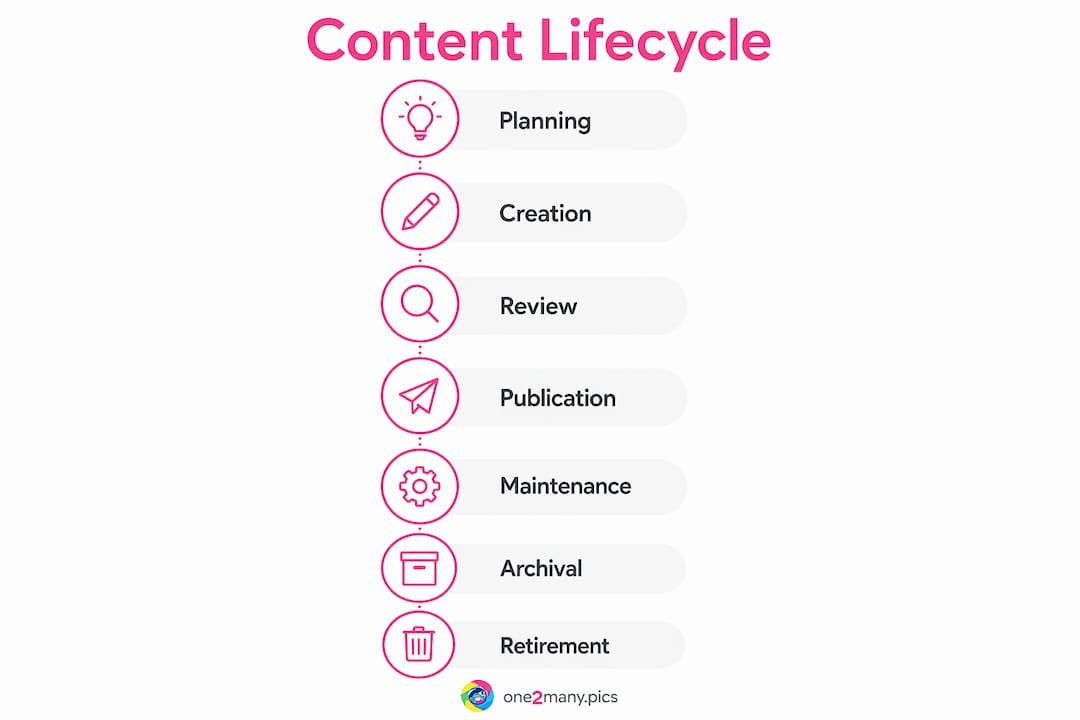
The content management lifecycle involves seven distinct stages: planning, creation, storage, editing and versioning, publishing, and removal or archival. Each stage requires defined ownership and a clear handoff process. Skipping any stage creates gaps that compound over time.
Here is how each stage functions in practice:
- Planning — Define the content goal, audience, format, and distribution channel before any creation begins.
- Creation — Writers, designers, or developers produce the content according to the plan.
- Storage — Content is saved in a centralized location with consistent naming conventions and folder structures.
- Editing and versioning — Reviewers provide feedback, and version history is maintained so no draft is permanently lost.
- Publishing — Approved content goes live on the correct channel at the scheduled time.
- Removal or archival — Outdated content is retired from public view and stored for reference or compliance purposes.
Many organizations focus only on creation and neglect the archival phase. Skipping content retirement causes content bloat, increases compliance risk, and makes long-term maintenance significantly harder. A product page from three years ago with outdated pricing is not just unhelpful. It is a liability.
| Lifecycle Stage | Primary Goal | Common Tool |
|---|---|---|
| Planning | Align on goals and format | Editorial calendar, Trello |
| Creation | Produce the content | Google Docs, Figma |
| Storage | Centralize and organize | DAM, cloud storage |
| Editing | Review and version control | CMS, collaborative editors |
| Publishing | Distribute to channels | CMS, social schedulers |
| Archival | Retire outdated content | DAM, archive folders |
Pro Tip: Set a content expiration date at the planning stage. Assign a team member to review each asset at the six-month mark. This prevents content bloat before it starts.
How do CMS and DAM systems differ?
A content management system, or CMS, focuses on assembling and publishing web or enterprise content. A digital asset management system, or DAM, serves as the source of truth for the underlying library of raw assets. Treating a CMS as a DAM leads to asset loss, version control failures, and duplicated files across teams.
A CMS like WordPress or Drupal lets teams create pages, manage editorial workflows, and publish content without relying on developers for every update. A CMS provides tools to build digital experiences, allowing teams to collaborate, maintain consistency, and publish efficiently. A DAM like ResourceSpace or Bynder stores the approved logo files, photography, and video assets that feed into the CMS. The two systems are complementary, not interchangeable.
| Feature | CMS | DAM |
|---|---|---|
| Primary function | Create and publish content | Store and organize assets |
| Key users | Editors, marketers, developers | Designers, brand managers |
| Metadata focus | Page structure and SEO | File tags, rights, and usage |
| Version control | Page revisions | Asset version history |
| Output | Live web pages | Downloadable files |
The most common mistake teams make is uploading final image files directly into their CMS media library and treating that as asset management. When the brand refreshes its logo or a photo license expires, there is no single source of truth to update. Every page that used that image must be manually corrected.
Pro Tip: Use your DAM as the single source of truth for all approved assets. Pull from the DAM into your CMS. Never upload raw or unapproved files directly into a CMS media library.
Why are governance and metadata non-negotiable?
Content governance is the framework that defines who creates, reviews, approves, and publishes content. Governance is the system behind the content that prevents duplicative work and brand inconsistency. Without it, even the most capable CMS produces fragmented, off-brand output.
Approximately 80% of all business data is unstructured, meaning it exists as PDFs, videos, images, and raw text with no consistent tagging or categorization. That statistic explains why so many teams cannot find their own content. Metadata converts unstructured files into discoverable assets by attaching searchable labels: topic, format, date, author, channel, and usage rights.
A practical governance framework covers four areas:
- Role definitions — Who is authorized to create, edit, approve, and publish content at each stage?
- Review workflows — What is the approval chain, and what are the turnaround time expectations?
- Naming and tagging conventions — How are files named, and what metadata fields are required at upload?
- Compliance and legal review — Which content types require legal sign-off before publication?
Without pre-defined roles and governance policies, even the best CMS platforms fail to prevent fragmented content and broken workflows. Software does not fix process problems. Governance does. For teams managing secure content sharing across multiple accounts or platforms, governance also determines what gets posted where and by whom.
Pro Tip: Build a simple content governance document before selecting any software. Define roles, approval steps, and metadata requirements. This document will outlast any platform you choose.
What tools and strategies handle high content volume?
Content velocity is the speed and volume at which content must be produced and distributed. Content velocity is now a primary driver for adopting centralized management systems and automated, API-driven architectures. Manual workflows break down when a team needs to publish across five channels simultaneously with localized variations for each.
Headless CMS platforms like Contentful or Sanity separate the content repository from the presentation layer. This means the same content can be delivered to a website, a mobile app, and a digital display without being reformatted manually each time. That architecture is the foundation of scalable content operations.
Automation addresses the volume problem directly. Teams that automate content posting reduce manual publishing errors, maintain consistent schedules, and free editors to focus on quality rather than logistics. For social media managers and agencies handling multiple accounts, automation is not a luxury. It is the only way to maintain output at scale.
Practical tools and strategies for managing high content volume include:
- Headless CMS (Contentful, Sanity) for multi-channel content delivery from a single source
- DAM platforms (ResourceSpace, Bynder) for centralized asset storage with metadata search
- Workflow automation tools for scheduling, approval routing, and publishing triggers
- Visual content strategy frameworks to plan content batches and reduce last-minute production pressure
- Programmable content architectures for enterprise teams needing API-driven distribution at scale
The teams that handle content velocity best are not the ones with the biggest budgets. They are the ones with the clearest processes and the most disciplined use of automation.
Key takeaways
Effective content management requires governance, structured lifecycle stages, and the right combination of CMS and DAM tools working together.
| Point | Details |
|---|---|
| Define the lifecycle first | Map all seven stages before selecting any software or platform. |
| Separate CMS from DAM | Use a DAM as the asset source of truth and feed content into your CMS from there. |
| Governance prevents chaos | Define roles, approval workflows, and metadata standards before content production begins. |
| Metadata makes content findable | Tag every asset at upload; untagged files are effectively invisible to your team. |
| Automate to handle volume | Use headless CMS and scheduling tools to publish consistently across multiple channels. |
The part most teams skip until it's too late
After working with content teams across social media, publishing, and brand management, one pattern stands out clearly: most teams buy software before they define their process. They spend weeks evaluating CMS platforms, comparing pricing tiers, and debating integrations. Then they launch with no governance document, no metadata standards, and no defined approval chain. Six months later, the CMS is a mess of duplicate files, inconsistent naming, and orphaned pages nobody owns.
The uncomfortable truth about content management is that the technology is the easy part. WordPress, Contentful, and Drupal are all capable platforms. What separates teams that succeed from teams that struggle is the work done before the first file is uploaded. That means writing down who approves what, how files get named, and what happens to content when it expires.
At One2many, we see this play out specifically with visual content. Creators and agencies upload images without stripping metadata, post the same asset across multiple accounts without variation, and then wonder why their reach drops. The content management problem is not just organizational. It is operational and technical. Privacy, variation, and distribution strategy are part of the content management picture, not separate concerns.
The teams that get this right treat content management as a discipline, not a software subscription. They invest in governance first, choose tools second, and automate third. That sequence is not glamorous. But it works.
— one2many.pics
Take your content management further with One2many
Managing digital content at scale means more than organizing folders. It means controlling how your content is distributed, protected, and received across every platform you publish on.

One2many is built for creators, social media managers, and agencies who need to manage visual content with precision. The platform removes metadata from images, generates unique visual variations, and supports bulk processing for teams publishing across multiple accounts. If your content management workflow includes social media distribution, One2many adds the privacy and variation layer that standard CMS tools do not cover. Explore One2many to see how it fits into your existing content workflow and helps you publish smarter across every channel.
FAQ
What is content management in simple terms?
Content management is the process of creating, organizing, storing, and distributing digital content across platforms in a controlled, consistent way. It covers everything from planning a blog post to archiving an outdated product page.
What is the difference between a CMS and a DAM?
A CMS creates and publishes web content, while a DAM stores and organizes the underlying digital assets like images, videos, and brand files. The two systems are complementary, not interchangeable, and confusing them leads to version control failures.
Why is metadata important in content management?
Metadata tags make unstructured files searchable and reusable across systems. Failing to establish a tagging strategy is the primary reason organizations lose track of digital assets over time.
What is content velocity and why does it matter?
Content velocity refers to the speed and volume at which content must be produced and distributed. Rising content velocity is the main reason teams adopt automated, API-driven architectures like headless CMS platforms.
How do i start building a content management strategy?
Start by mapping your content lifecycle stages, defining team roles and approval workflows, and establishing metadata standards before selecting any software. Governance and process come before platform selection every time.