

Secure image upload is defined as a multi-layered process that protects images during transmission and storage through validation, malware scanning, encrypted storage, and access control. Unlike basic file hosting, a properly secured upload pipeline enforces data integrity, confidentiality, and availability at every step. The six core security layers are type validation, size limits, filename sanitization, malware scanning, isolated storage, and monitoring. Technologies like AES-256-GCM encryption, presigned URLs, and tools like ClamAV are the current standard for implementing these protections. Whether you manage a personal portfolio or run a content operation at scale, understanding how to upload images securely is no longer optional.
What is secure image upload and why does it matter?
A secure image upload process treats every incoming file as a potential threat until proven otherwise. Basic file hosting lacks the safeguards that purpose-built image hosting APIs implement by default, including HTTPS enforcement, access control, and malware scanning. That gap is where attackers operate, injecting malicious files disguised as images or harvesting metadata from unprotected uploads.
The consequences of an insecure upload system range from server compromise to privacy violations. An image file can carry embedded scripts, GPS coordinates, device identifiers, and timestamps. Without proper image upload security measures, that data reaches your server and potentially your users.

Secure image storage is the downstream result of a secure upload process. If validation and scanning fail at the point of upload, no amount of storage-level encryption fully compensates. Security must start at the moment a file is submitted.
What are the key components of a secure upload process?
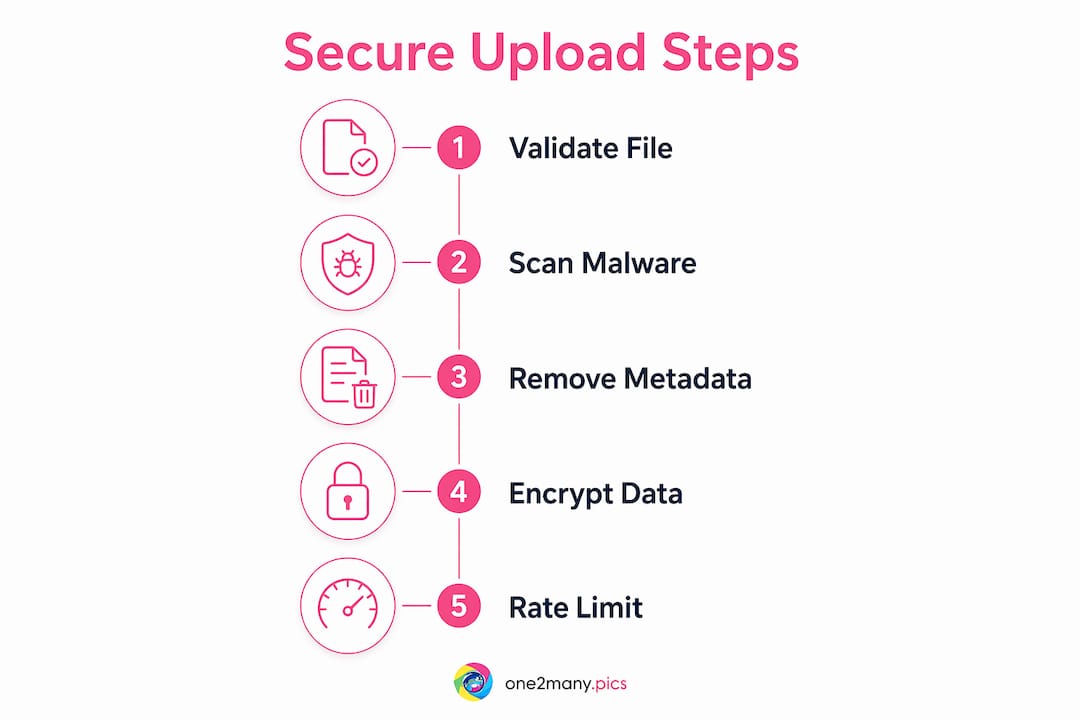
A secure upload pipeline is not a single feature. It is a sequence of enforced checks, each designed to catch what the previous layer missed.
- File type validation: Check the binary signature of the file, not just the extension or MIME type declared by the browser. Extensions are trivially renamed; magic numbers reveal the true file type regardless of what the filename says.
- File size limits: Set hard limits server-side. Oversized files can crash processing pipelines or be used in denial-of-service attacks.
- Filename sanitization: Strip special characters, path separators, and user-supplied names entirely. Generate a random filename on the server to prevent path traversal attacks.
- Malware scanning: Pass every uploaded file through a scanner like ClamAV before it touches permanent storage. This step catches embedded payloads that pass type validation.
- Isolated storage: Store images outside the web root in a directory that cannot be accessed via a direct URL. Serve files through a controlled endpoint that enforces access permissions.
- Monitoring and logging: Log every upload event, including IP address, file size, and outcome. Use middleware like morgan for request logging and helmet for HTTP security headers.
Pro Tip: Never rely on client-side validation as a security measure. Attackers can modify HTTP requests to bypass any check that runs in the browser. Server-side validation is the only validation that counts.
Rate limiting is the final layer most developers forget. Using middleware like express-rate-limit restricts the number of uploads per IP address, which protects against denial-of-service attacks caused by excessive simultaneous upload requests.
How do presigned URLs create a more secure upload flow?
The traditional upload model routes files through your application server before they reach storage. That model increases attack surface, adds latency, and puts your server in direct contact with potentially malicious content. The modern alternative uses presigned URLs to eliminate that exposure.
The three-step presigned URL flow works as follows:
- Generate a presigned URL on the server. Your backend creates a short-lived, signed URL that grants temporary write permission to a specific location in cloud storage. The URL expires in minutes, limiting the window for abuse.
- Upload directly from client to cloud storage. The browser sends the file straight to AWS S3 or Cloudflare R2 using the presigned URL. Your server never handles the raw file bytes.
- Finalize server-side. After the upload completes, your server verifies the stored object's size and file type before marking it as accepted. Any file that fails verification is deleted immediately.
| Step | Action | Security benefit |
|---|---|---|
| Generate presigned URL | Server creates a time-limited signed URL | Limits upload window; no credentials exposed to client |
| Direct client upload | File goes straight to S3 or Cloudflare R2 | Server never processes raw file bytes |
| Server-side finalization | Verify object size and type in storage | Catches mismatches before file is accepted |
This pattern scales well because cloud storage handles the bandwidth load. AWS S3 and Cloudflare R2 both support presigned PUT URLs natively, and the finalization step gives you a second validation pass without the performance cost of routing files through your own infrastructure.
What are the trade-offs of end-to-end encryption for image uploads?
End-to-end encryption (E2E) for image uploads means the image is encrypted on the user's device before it ever leaves their browser. The server receives ciphertext, not a readable image. This is the highest privacy guarantee available for image upload safety.
The standard algorithm for this use case is AES-256-GCM, which provides both encryption and authentication in a single pass. E2E encryption prevents CDNs from edge caching or transforming images, which increases latency and operational cost. That trade-off is significant for high-traffic platforms that depend on CDN delivery for performance.
| Factor | With E2E encryption | Without E2E encryption |
|---|---|---|
| Privacy level | Maximum; server sees only ciphertext | Standard; server processes plaintext image |
| CDN caching | Not possible; encrypted blobs cannot be cached | Fully supported |
| Image processing | Disabled server-side | Resizing, compression, and transformation available |
| Latency | Higher due to client-side encryption overhead | Lower |
| Operational cost | Increased storage and compute costs | Standard |
E2E encryption is the right choice when image sensitivity justifies the performance cost. Medical imaging, legal documentation, and private personal content all qualify. For general social media uploads or marketing assets, standard TLS in transit combined with AES-256 at rest delivers strong protection without the operational overhead.
Pro Tip: Encryption disables CDN edge caching and image transformation features. Decide on your encryption model before designing your delivery architecture, not after.
What practical steps implement secure image uploads?
Securing image uploads does not require a complete infrastructure overhaul. These steps apply whether you are a solo developer or a security team managing enterprise content pipelines.
- Validate file type by magic number. Read the first bytes of every uploaded file and compare them against known signatures for JPEG, PNG, GIF, and WebP. Do not trust the file extension or the Content-Type header.
- Strip EXIF and metadata automatically. Use libraries like sharp or exiftool-vendored to remove GPS location, device identifiers, and timestamps from every image before it enters storage. This single step eliminates a major privacy exposure that most upload systems ignore.
- Generate random filenames. Never store a file under its original name. Use a UUID or cryptographic hash as the filename. Randomized filenames combined with storage outside the web root prevent direct URL access and path traversal exploits.
- Scan with antivirus tools. Integrate ClamAV or a commercial equivalent into your upload pipeline. Schedule regular signature updates so the scanner recognizes current threats.
- Apply rate limiting and CAPTCHA. Limit upload requests per IP using express-rate-limit or equivalent middleware. Add CAPTCHA for public-facing upload forms to block automated abuse.
- Audit your pipeline regularly. Use tools like helmet for HTTP security headers and morgan for logging. Continuous security audits catch configuration drift and new vulnerabilities before attackers do.
Pro Tip: Store your images in a private cloud bucket with no public access policy. Serve them through signed, time-limited URLs rather than permanent public links. This gives you the ability to revoke access to any image instantly.
How does secure uploading connect to broader image privacy?
Secure image upload is the foundation, but privacy does not end when the file reaches storage. The same image that was uploaded securely can still expose you if it is served without access controls, shared across platforms with metadata intact, or posted in ways that create a traceable digital footprint.
For content creators and social media managers, protecting creative work on social platforms requires thinking beyond the upload event itself. Platforms like Instagram, TikTok, and X analyze image metadata and pixel-level fingerprints to detect duplicate content and enforce shadowbanning policies. An image that was uploaded securely to your server can still be flagged when it reaches a social platform.
Practical steps for cross-platform privacy include:
- Remove metadata before every upload, not just on initial ingest.
- Generate visual variations of images posted across multiple accounts to avoid duplicate detection.
- Use secure posting practices that separate your identity from your content at the platform level.
- Review your cloud storage access policies quarterly to confirm no buckets have drifted to public access.
The most complete privacy strategy treats upload security and post-upload content control as a single workflow, not two separate concerns.
Key takeaways
Secure image upload requires server-side validation, malware scanning, metadata removal, and encrypted storage working together. No single layer is sufficient on its own.
| Point | Details |
|---|---|
| Validate by magic number | Check binary file signatures server-side; never trust extensions or MIME types from the client. |
| Use presigned URLs | Direct client-to-cloud uploads via AWS S3 or Cloudflare R2 reduce server exposure and scale better. |
| Strip metadata on every upload | Remove EXIF data using sharp or exiftool-vendored to eliminate GPS, device, and timestamp exposure. |
| Match encryption to sensitivity | AES-256-GCM E2E encryption maximizes privacy but disables CDN caching and image transformation. |
| Audit and monitor continuously | Use helmet, morgan, and regular security audits to keep upload pipelines resilient against new threats. |
The security mistake most creators make
Most people treat image upload security as a one-time setup. They add a file type check, maybe a size limit, and consider the job done. That is the mistake I see most often, and it is the one that costs the most.
Security is not a configuration. It is a process. The threat model for image uploads in 2026 includes AI-generated payloads, metadata harvesting at scale, and platform-level fingerprinting that most upload systems were never designed to address. A pipeline that was secure in 2023 may have gaps today simply because the tools attackers use have changed.
The other underestimated issue is metadata. Developers focus on malware and access control, which are the right priorities, but they routinely skip EXIF stripping. That oversight hands over GPS coordinates, device models, and shooting timestamps to anyone who downloads the file. For individual creators, that is a personal safety issue. For businesses, it is a compliance risk.
What I have found actually works is treating every upload as a fresh threat. Validate the file type by its binary signature. Strip all metadata before storage. Serve through signed URLs with short expiry windows. Audit the pipeline every quarter. And recognize that upload security and content privacy are the same problem viewed from different angles. Solving one without the other leaves you exposed.
— one2many.pics
Protect your images with One2many

One2many is built for creators and businesses who need image privacy to work at scale. The platform removes metadata including GPS location, device info, and timestamps from every image automatically, then generates unique visual variations to prevent duplicate detection across platforms. Uploads are handled through a secure process with controlled access and no permanent public exposure of your files. If you manage content across multiple accounts or platforms and need to protect your digital footprint without rebuilding your workflow, explore One2many to see how secure image hosting and privacy controls work in practice.
FAQ
What is the difference between secure and standard image upload?
Standard image upload transfers a file to a server with no validation, scanning, or access control. Secure image upload enforces file type verification, malware scanning, metadata removal, and encrypted storage before the file is accepted or served.
Why can't I rely on file extensions to validate image types?
File extensions are user-supplied and trivially renamed. A malicious file named "photo.jpg" can contain executable code. Magic number validation reads the binary signature of the file itself, which cannot be faked by renaming.
Does encrypting images before upload affect performance?
Yes. AES-256-GCM client-side encryption prevents CDN edge caching and server-side image transformation, which increases latency and storage costs. Reserve E2E encryption for high-sensitivity content where privacy outweighs the performance trade-off.
What metadata should be stripped from uploaded images?
At minimum, strip GPS coordinates, device model, software version, and timestamps. Libraries like sharp and exiftool-vendored automate this process and integrate directly into Node.js upload pipelines.
How do presigned URLs improve upload security?
Presigned URLs allow clients to upload directly to cloud storage like AWS S3 without routing files through your application server. The URL expires within minutes, and server-side finalization verifies the stored object before it is accepted, reducing both attack surface and server load.