

Every photo you post, every app you authorize, and every account you forget about is building a profile of you that you never agreed to share. For digital creators, influencers, and marketers, that exposure carries real professional risk. This secure digital footprint guide will walk you through exactly what you're leaking, how to stop it, and how to maintain control over your online presence without going dark. With over 75% of global internet traffic now monitored by AI systems, the stakes for creators have never been higher.
Table of Contents
- Key takeaways
- Understanding your digital footprint as a creator
- Building your privacy toolkit before you start
- Step-by-step: reducing and securing your footprint
- Ongoing maintenance and monitoring
- My honest take on privacy as a creator
- How One2many helps creators post without leaving a trace
- FAQ
Key takeaways
| Point | Details |
|---|---|
| Active vs. passive exposure | Your footprint includes both what you post and what platforms silently collect without your input. |
| Audit before you act | Inventory every account and data source before attempting any cleanup or privacy settings adjustment. |
| Data brokers require ongoing work | Opting out once is not enough. Brokers rebuild profiles continuously from public records. |
| Email aliases limit damage | Using aliases for different platforms means a breach of one contact point does not expose everything. |
| Maintenance beats one-time fixes | A quarterly review cycle, not a single cleanup sprint, is what actually keeps your footprint under control. |
Understanding your digital footprint as a creator
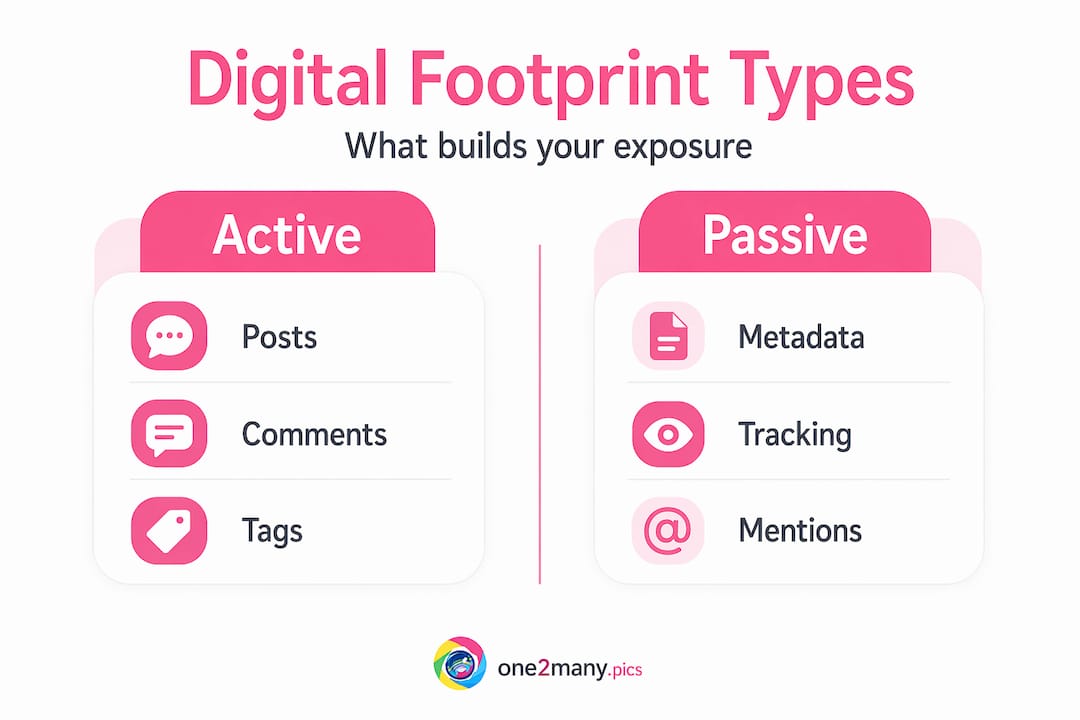
Your digital footprint splits into two categories, and most creators only think about one of them.
The active footprint is the obvious layer: posts, comments, bios, tagged photos, reviews, and every account you have ever signed up for. The passive footprint is what gets collected without your direct input. This includes browser cookies, IP address logs, device fingerprints, metadata embedded in image files, and behavioral data harvested by third-party analytics platforms embedded on websites you visit.
For creators and marketers, the passive side is where the real risk hides. Platforms use your behavioral data for ad targeting, but that same data can be accessed by data brokers who sell detailed profiles to anyone willing to pay. These profiles feed into AI systems that build predictive models about your habits, interests, location, and income range.
The specific risks for creators go beyond generic privacy concerns:
- Reputation damage from old posts, deleted accounts that still show up in cached searches, or embarrassing content shared by others
- Targeted scams from bad actors who use your public profile to craft convincing phishing attempts
- AI profiling that affects your reach, content suppression, or even brand partnership decisions
- Platform fingerprinting that links accounts you intended to keep separate
Pro Tip: Search your name and handle in incognito mode every month. What you find is what a brand partner, journalist, or bad actor sees before they ever reach out to you.
Understanding what forms your footprint is the foundation for everything else. You cannot reduce what you have not mapped.
Building your privacy toolkit before you start
Jumping straight into deleting accounts and adjusting settings without a system is how things get missed. The preparation phase matters.
Start with a complete inventory. List every platform where you have an account, every app that has access to your social logins, and every service where your email address appears. This sounds tedious, but it takes about 30 minutes and reveals exposure points most people had genuinely forgotten about.

Tools worth adding to your setup
| Tool Type | What It Does | Why It Matters for Creators |
|---|---|---|
| Password manager | Generates and stores unique passwords per account | Prevents credential stuffing across platforms |
| Email alias service | Creates unique addresses per service | Isolates breach damage to a single alias |
| Privacy-focused browser | Blocks trackers and fingerprinting scripts | Reduces passive data collection significantly |
| Breach notification service | Alerts you when your email appears in leaked data | Speeds up your response time after incidents |
| Google Alerts | Monitors mentions of your name and brand | Catches reputation issues before they compound |
Password managers are not optional at this stage. They are the backbone of account hygiene for anyone managing multiple platforms. Pair that with an email alias service, and you have the two structural tools that make everything else in this guide actually work.
Pro Tip: Set up a dedicated email alias just for brand partnerships and PR contacts. If it gets compromised or sold, you shut down that alias without disrupting your personal or business email.
Once your toolkit is in place, configure Google Alerts for your full name, your main handle, and your brand name. Set alerts to daily delivery. This is one of the most overlooked digital footprint tips for creators who are actively building a public presence.
Step-by-step: reducing and securing your footprint
This is where you take control. Work through these in order because each step builds on the last.
-
Audit and delete unused accounts. Dormant accounts are active security liabilities. They hold old passwords, outdated personal info, and sometimes payment data. Use a tool like JustDeleteMe to find deletion pages for services you no longer use. Be thorough. A forum account from 2014 with your home city and birthday in the profile is a data broker's favorite resource.
-
Tighten privacy settings across all active platforms. Go platform by platform. On Instagram and Facebook, restrict who can see your tagged photos, turn off location data in posts, and revoke access for any connected apps you no longer use. On LinkedIn, disable the feature that tells others you viewed their profile if you are doing competitive research.
-
Upgrade your password security. Passwords should be at least 12 characters with a mix of uppercase, lowercase, numbers, and symbols. Every account gets a unique password. No exceptions. Your password manager handles the memory work.
-
Enable multi-factor authentication (MFA) everywhere. MFA blocks over 99.9% of automated cyberattacks, even when a password is already compromised. Use an authenticator app over SMS where possible, since SIM-swapping attacks make text-based codes less secure.
-
Deploy email aliases for compartmentalization. Email aliases allow targeted isolation of any contact point that gets breached, without forcing you to update your primary email across every service. Services like SimpleLogin and Apple's Hide My Email make this easy. Check our deeper breakdown on how to manage multiple accounts safely for creator-specific workflows.
-
Opt out of data brokers. Sites like Spokeo, Whitepages, BeenVerified, and dozens more are actively selling your information right now. Submit opt-out requests manually or use a paid removal service. The critical caveat: brokers regenerate profiles continuously from public records, so this must be treated as an ongoing task, not a one-time fix.
-
Control what you share and when you share it. Posting your location in real time is a security risk. Delay geotagged posts by at least a few hours. Before sharing anything, assess whether the benefit of posting it outweighs the risk of it being misused. This applies to innocuous details like your neighborhood, your gym, or your child's school.
-
Clean your browser regularly. Clear cookies and cache weekly. Install a tracker-blocking extension. Switch to a privacy-respecting search engine for general research. These small changes reduce your passive footprint more than most creators realize. For a full breakdown of content-specific privacy settings, the social media posting best practices guide covers the platform-by-platform details.
Pro Tip: Use separate browsers for separate purposes. One browser for logged-in creator work, one for anonymous research. This alone stops a significant amount of cross-site behavioral tracking.
Ongoing maintenance and monitoring
Securing your footprint once is not the same as keeping it secure. The threat environment changes. Your accounts accumulate. New platforms emerge. Maintenance is what separates a secure digital presence from a false sense of security.
A quarterly audit is the baseline for most creators. If you have experienced a breach or had personal information exposed, move to monthly audits for three months before returning to the quarterly cycle. Each audit should cover new accounts created, app permissions granted, and any breach alerts received.
Monitoring needs to run continuously between audits:
- Keep breach notification services active (Have I Been Pwned is free and reliable)
- Review Google Alerts weekly for new mentions
- Check connected apps on your major platforms monthly
- Watch for new data broker profiles using a scheduled Google search of your name
One overlooked piece: your footprint is partially built by other people. Friends tagging you in photos, colleagues listing you in blog posts, family members sharing your updates publicly. You cannot fully control this, but you can have a direct conversation with your close circle about your privacy boundaries. It feels awkward once. It pays off indefinitely.
Pro Tip: Create a "privacy review" event in your calendar every three months with a checklist attached. Treat it like a business task, not a personal errand. Creators who protect their online privacy consistently treat privacy management as professional maintenance, not a reaction to problems.
The long-term goal is a mindset shift toward digital minimalism: deliberately shrinking your exposure footprint to only what serves your goals. Every account, every app, every shared post should have a reason to exist.
My honest take on privacy as a creator
Most advice on this topic frames digital privacy as a binary: you are either exposed or you are protected. In my experience working with creators across platforms, that framing is the main reason people give up. They try to fix everything at once, realize total anonymity is impossible, and go back to posting carelessly.
The real goal is data minimalism, not invisibility. I have seen creators reduce their exposure dramatically without sacrificing reach or brand building. The difference between them and everyone else is not the tools they use. It is that they treat privacy as a workflow rather than a project.
The things that actually bite people are not the dramatic breaches. They are the dormant accounts from six years ago that still hold a phone number, the metadata in images that reveals a home location, and the data broker profiles that aggregate details no single post would reveal on their own. Those quiet leaks compound over time.
My contrarian take: the accounts you forgot about are more dangerous than the ones you actively manage. A social media profile you check daily has fresh settings and current context. An account you abandoned in 2019 has none of that. It sits there, unchanged, with outdated personal data, probably linked to a password you still use somewhere.
If you take one thing from this guide, make it the audit. Everything else follows from knowing what you actually have out there. The social media fingerprints guide goes deeper on platform-specific exposure patterns if you want to take that step further.
— one2many.pics
How One2many helps creators post without leaving a trace
Adjusting settings and deleting accounts handles a lot of your digital footprint exposure. But one area that most guides skip entirely is the metadata embedded in every image you upload.

Every photo carries hidden data: your device model, GPS coordinates, timestamp, and camera settings. Platforms read this. So do data brokers. One2many strips that metadata and generates unique image variations, so every upload is clean and untraceable across accounts. If you are posting across multiple platforms or managing content at scale, create untraceable social media images with One2many and remove one of the most overlooked privacy risks in a creator's workflow. It takes seconds per image and fits directly into how you already work.
FAQ
What is a digital footprint?
A digital footprint is the trail of data you leave online through both active actions, like posting and signing up for accounts, and passive collection, like cookies and metadata. Everything from your IP address to the device info embedded in your photos contributes to it.
How often should I audit my digital footprint?
A quarterly audit is the standard recommendation for most individuals. If you have experienced a data breach, switch to monthly audits for three months before dropping back to quarterly.
Can I fully remove myself from data broker sites?
Not permanently. Data brokers continuously rebuild profiles from public records, which means opt-out requests need to be resubmitted regularly. Paid removal services automate this process.
Does image metadata really matter for privacy?
Yes, significantly. Photos taken on smartphones typically contain GPS coordinates, device model, and timestamps. Posting images without stripping this data can expose your location and equipment to anyone who downloads or analyzes the file.
What is the fastest way to reduce my digital trace?
Start by deleting unused accounts, enabling MFA on active ones, and setting up email aliases for any new services you join. These three steps create the biggest reduction in exposure for the least amount of time spent.