

Most creators think image transformation means cropping a photo or adjusting brightness. The reality is far more interesting. Image transformation explained properly covers everything from spatial geometry shifts and pixel-level color manipulation to AI-driven style transfers and format conversions that shrink file sizes without sacrificing quality. For digital creators, marketers, and social media professionals, understanding these techniques is the difference between posting content reactively and building a system that protects your privacy, diversifies your output, and scales without breaking down.
Table of Contents
- Key Takeaways
- Fundamentals of image transformation: spatial and pixel-level methods
- AI-driven image transformation techniques
- Image compression and format conversion as transformation
- Combining transformations for privacy and content diversification
- Choosing the right tools for your transformation workflow
- My take on image transformation in 2026
- How One2many puts image transformation to work for you
- FAQ
Key Takeaways
| Point | Details |
|---|---|
| Two core transformation types | Spatial and pixel-level transformations serve different purposes and produce very different visual outcomes. |
| AI transforms have real limits | Diffusion-based models and upscalers can hallucinate details, making quality checks non-negotiable. |
| Compression is a transformation | Format conversion and compression actively reshape your image data, not just its file size. |
| Chaining transforms protects privacy | Combining multiple operations obscures the original image's digital fingerprint while keeping visual appeal. |
| Tool selection changes everything | The right API or platform determines whether your transformation workflow scales or stalls. |
Fundamentals of image transformation: spatial and pixel-level methods
At its core, image transformation explained means changing an image's structure, appearance, or data in a controlled way. The field breaks down into two primary families, and knowing which one you're working with shapes every decision you make afterward.
Spatial transformations operate on the geometry of an image. Rotation spins pixels around a center point. Scaling enlarges or shrinks the image by multiplying coordinate values. Shearing slants the image along one axis, which creates that skewed parallelogram effect you've seen in design work. Perspective transformation goes further, simulating a 3D viewpoint change so a flat image looks like it was photographed from a different angle. These are all coordinate-mapping operations. The system asks: "Where does this pixel move to?" and redraws accordingly.
Pixel-level transformations work differently. Instead of moving pixels around, they change what each pixel looks like. Brightness adjustments add or subtract from every pixel's intensity value. Contrast manipulation spreads or compresses the range between dark and light. Color jitter randomly shifts hue and saturation, which is especially useful when creating content variations. Noise injection adds random grain across the image.
One concept worth understanding is label invariance. Image augmentation changes pixels or geometry without altering what the image means. A photo of a product rotated 15 degrees is still recognizably that product. This matters for machine learning, but it matters just as much for creators who need to generate unique versions of the same image without losing brand identity.
The table below shows how these transformations compare in practice:
| Transformation type | Example operation | Primary effect | Common use case |
|---|---|---|---|
| Spatial: rotation | Rotate 15 degrees | Shifts pixel positions geometrically | Content variation, augmentation |
| Spatial: perspective | Warped angle | Simulates 3D camera shift | Product photography editing |
| Pixel-level: color jitter | Hue shift +10 | Changes color appearance | Social media content diversification |
| Pixel-level: brightness | +20 intensity | Brightens overall image | Consistency across lighting conditions |
| Affine transformation | Shear + scale combined | Multiple geometric changes at once | Batch processing and automation |
Pro Tip: Start with pixel-level transforms when your goal is content diversification. They change the image's digital fingerprint without altering the composition your audience responds to.
AI-driven image transformation techniques
The modern layer of image transformation is where things get genuinely complex and occasionally unpredictable. AI-based methods do not follow fixed rules. They generate outputs based on patterns learned from millions of images, which means they can produce results that no manual edit could replicate and errors that no manual editor would make.
Diffusion-based image-to-image transformation is the dominant AI approach right now. The model takes your input image, applies controlled noise, then denoises it toward a new output guided by a text prompt or style reference. The key parameter is denoising strength: a value of 0.0 returns your original image unchanged, while 1.0 creates something entirely new. Values between 0.3 and 0.5 are the practical sweet spot for most marketing and social media applications because they preserve your original composition while applying meaningful visual changes.
AI upscaling works on a different principle. Rather than interpolating between existing pixels, it reconstructs plausible detail beyond traditional methods, generating texture and sharpness that did not exist in the original. Trained on massive pairs of low and high-resolution images, these models genuinely improve visual quality in many cases.

But the limitations matter. AI upscaling struggles with text, diagrams, and technical imagery because it tends to hallucinate plausible-looking content that is actually incorrect. A street sign in the background might be sharpened into readable but wrong letters. A product label can gain crisp but invented text. These are not edge cases. They are consistent failure patterns that experienced practitioners plan around.
When choosing your upscaling factor, 2x delivers the most reliable results. The 4x option generates more apparent detail but introduces significantly higher error risk, especially for images with fine patterns or embedded text. Quality improvements also diminish noticeably beyond 2x for most social media and marketing use cases.
Here are the best practices worth committing to when working with AI image transformation:
- Always inspect AI-upscaled outputs at 100% zoom before publishing, especially around text elements and edges
- Keep denoising strength below 0.5 when original composition needs to carry through to the final image
- Avoid using AI upscaling on screenshots, infographics, or any image where text accuracy matters
- Use style transfer sparingly for brand content since high denoising values can strip recognizable visual identity
- Test multiple outputs from the same input at the same settings. AI outputs vary, and the first result is rarely the best
Pro Tip: Think of AI transformation parameters as dials, not switches. Small adjustments produce meaningfully different results. Run at least three variations at different denoising strengths before committing to a final output.
Image compression and format conversion as transformation
Compression gets underestimated because it feels like a technical afterthought rather than a creative tool. That framing is wrong. When you convert an image from JPEG to WebP or apply quantization during export, you are performing a genuine transformation on the pixel data itself.
JPEG compression works through a process called Discrete Cosine Transform. The image is divided into small blocks, each block's pixel values are converted into frequency components, and less visually important frequencies are discarded. The result is a smaller file with some information permanently removed. Modern formats like WebP reduce file size by 25 to 34% compared to JPEG at equivalent visual quality, using more sophisticated compression algorithms.
The full compression pipeline for most modern formats follows these steps: color space conversion (RGB to YCbCr), chroma subsampling to reduce color data while preserving luminance, block-based frequency analysis, quantization to remove imperceptible detail, and entropy coding to store the result efficiently. Each step changes the underlying image data. The output is not just a smaller file. It is a genuinely different version of the original image.
For creators and marketers, this matters practically. Compression and format conversion integrated into production pipelines reduce bandwidth consumption, speed up page loads, and improve the delivery experience on mobile devices where slow images kill engagement. The table below breaks down the most common formats:
| Format | Compression method | Key advantage | Best use case |
|---|---|---|---|
| JPEG | DCT, lossy | Universal compatibility | Photography, social posts |
| WebP | Hybrid, lossy/lossless | 25-34% smaller than JPEG | Web delivery, modern platforms |
| PNG | DEFLATE, lossless | No quality loss | Logos, graphics with transparency |
| AVIF | AV1-based, lossy | Best compression efficiency | Next-gen web delivery |
Combining transformations for privacy and content diversification
This is where image transformation techniques become strategically interesting for creators and marketers. Individual operations like rotation or brightness adjustment are useful. Chaining multiple operations together is where real content differentiation and privacy protection happen.
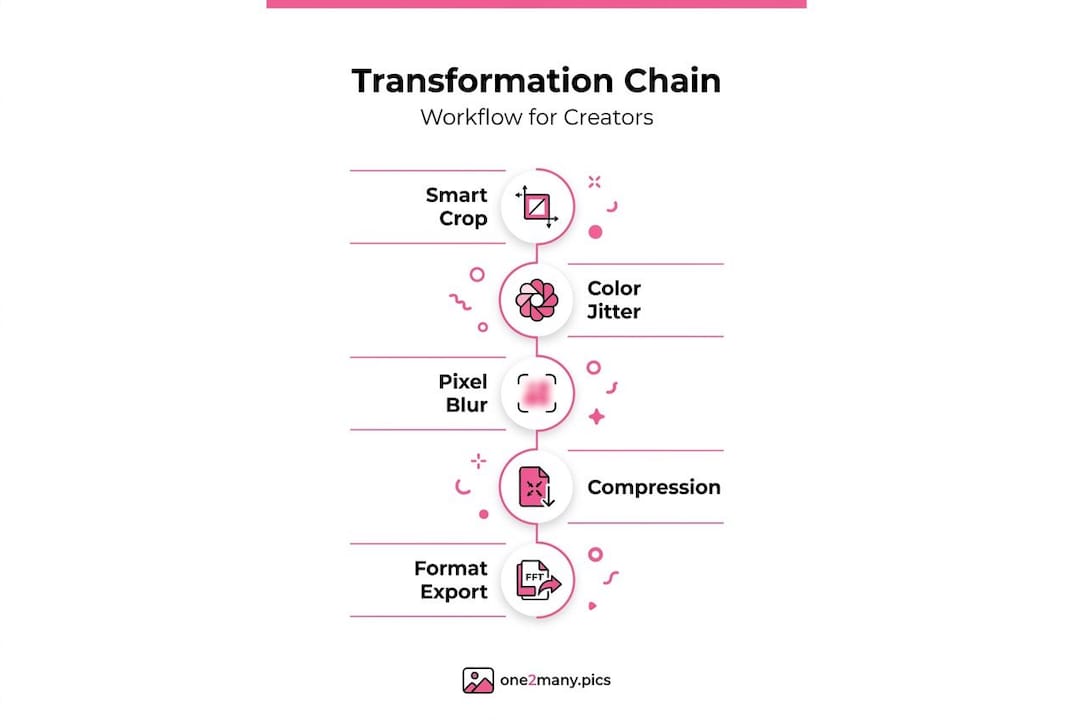
A practical workflow might look like this: smart crop to reframe the subject, color jitter to shift the hue and saturation slightly, a subtle spatial rotation under five degrees, noise injection at low intensity, and finally a format conversion with moderate compression. The output image is visually coherent and brand-appropriate, but its pixel data, metadata, and structural fingerprint are distinct from the original. Platforms that scan for duplicate content will treat it as a new image.
Smart cropping deserves specific mention here. Unlike center cropping, which blindly cuts to the middle of the frame, AI-powered smart crop detects the primary subject, whether that is a face, a product, or a focal object, and frames the crop around it. When combined with other transformations, this means each variation still looks intentional and well-composed rather than randomly altered.
The privacy angle is direct. Original images carry metadata including location data, device information, and timestamps. Transformations strip this data and alter the underlying pixel signature. Posting transformed versions protects your creative work on social platforms while letting you maintain a consistent visual presence across multiple accounts.
Here is what chaining transformations delivers for marketers specifically:
- Duplicate detection avoidance across platforms without manual editing
- Content that looks fresh even when drawn from the same source material
- Protection of the original high-resolution asset from fingerprinting
- Flexibility to post similar content across different accounts without triggering suppression
- Metadata removal that breaks the link between your posting behavior and your physical location or device
Pro Tip: When building a transformation chain for privacy, prioritize operations that change pixel values over purely geometric ones. A platform's duplicate detection algorithm is more likely to be fooled by color shifts and noise than by a simple rotation.
For a deeper look at scaling visual content safely, the approach matters as much as the transformations themselves.
Choosing the right tools for your transformation workflow
The market for image transformation tools in 2026 breaks into four categories: full media platforms with built-in CDN delivery, CDN-based optimizers that add transformation as a feature, focused transformation APIs with no storage, and AI-specialized tools built around generative features.
Choosing between these depends on your infrastructure and goals. If you already have cloud storage and delivery sorted, a focused transformation API is usually the better choice. It keeps your pipeline lean and does not force you to pay for redundant CDN features you do not need. If you are building from scratch, a media platform that bundles storage, transformation, and delivery may be worth the higher cost.
The single biggest efficiency gain in any transformation workflow comes from chaining multiple operations in one API call. Sequential processing through separate requests introduces latency and increases the chance of inconsistent results between steps. A single call that crops, resizes, adjusts color, converts format, and compresses in one pass is faster and produces more predictable output.
When evaluating any tool, ask these questions before committing:
- Can I chain multiple transformations in a single request without intermediate storage?
- Does the platform support AI upscaling, smart cropping, and background removal natively?
- How does the API handle batch processing for bulk social media workflows?
- What format outputs are supported, and does WebP or AVIF delivery come standard?
- Is metadata stripping built into the transformation pipeline or a separate step?
The answers will narrow the field quickly. Most tools do a few things well and others poorly. Knowing your priority operations before you evaluate means you stop choosing the most popular platform and start choosing the right one.
My take on image transformation in 2026
I've seen creators treat image transformation as a one-time technical task they outsource or ignore entirely. That mindset is expensive. What I've learned working on transformation workflows is that the technical and creative sides are inseparable. You cannot automate your way to great content without understanding what each operation actually does to your images.
The AI hallucination problem is more widespread than most people acknowledge. I've watched marketers publish AI-upscaled images with distorted product labels and slightly wrong brand colors because they trusted the output without inspecting it. That kind of error damages credibility in ways that are hard to quantify and easy to prevent.
What actually works is building a hybrid approach: automated transformation chains for scale, with human review at the final step for anything client-facing or brand-critical. The automation handles volume. The human check catches the edge cases that algorithms get wrong.
My honest view is that most creators are leaving serious privacy and reach advantages untouched because they see transformation as complicated. It is not. Once you understand the two core families (spatial and pixel-level) and how compression fits in, the rest is just choosing which operations to chain and in what order. Start simple. Add complexity as you learn what your specific platforms respond to. The content variations that maximize reach and privacy are almost always the ones built from a clear, tested process rather than a complicated one.
— one2many.pics
How One2many puts image transformation to work for you
If you've spent time understanding image transformation techniques and now want to apply them without building a pipeline from scratch, One2many was built for exactly that. The platform handles the entire transformation chain including metadata removal, pixel-level variation, smart cropping, and format conversion in a workflow designed specifically for social media creators and marketing teams.

You upload your original image, set your variation preferences, and download multiple unique versions ready to post across platforms and accounts. No duplicate detection flags. No exposed metadata. No manual editing per image. One2many is built for creators who need unique images for social media at volume without sacrificing privacy or visual quality. Explore what it can do for your workflow at one2many.pics.
FAQ
What is image transformation in simple terms?
Image transformation is any process that changes an image's appearance, structure, or underlying data. This includes spatial operations like rotation and cropping, pixel-level adjustments like brightness and color shifts, AI-based style transfer, and format conversion.
How do image transformations help with social media privacy?
Transformations strip metadata (location, device info, timestamps) and alter the pixel signature of an image, making each version look unique to platform detection systems. This prevents duplicate content flags and hides your digital footprint.
What denoising strength should I use for AI image-to-image transformation?
Values between 0.3 and 0.5 give the best balance between preserving your original composition and applying meaningful visual changes. Values above 0.7 tend to lose the original structure entirely.
Is AI upscaling safe to use on all image types?
No. AI upscaling works well on photographs and natural imagery but struggles with text and diagrams because it can hallucinate incorrect details. Always inspect upscaled outputs before publishing.
What is the most efficient image format for social media delivery?
WebP offers the best balance of compatibility and compression efficiency, reducing file size by 25 to 34% compared to JPEG at equivalent visual quality. AVIF delivers even better compression but has slightly less universal platform support in 2026.